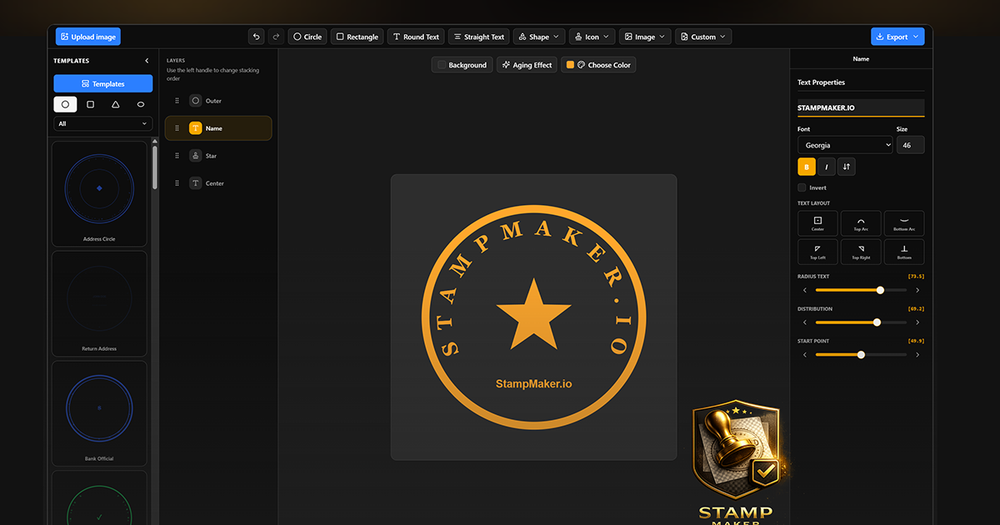
Stamp Maker is a comprehensive online platform designed to streamline the entire digital stamp workflow, from initial creation to final application. It eliminates the need for complex design software like Photoshop by providing a browser-based suite of AI-assisted tools.
Core Capabilities:
- Create Digital Stamps: Users can generate clean, transparent digital stamps from scratch using a variety of templates, custom text, and layered designs. This includes company seals, personal name stamps, and various business stamps. The AI Stamp Generator can even turn text prompts into stamp images.
- Repair Blurry or Damaged Stamps: The platform offers advanced AI tools to sharpen worn, blurry, or low-quality legacy stamp images, transforming them into cleaner, reusable assets. This feature is crucial for digitizing old physical stamps.
- Extract Transparent Seals: Stamp Maker allows users to isolate stamp artwork from various sources, including screenshots, scanned documents, and images with noisy backgrounds. Tools like the Signature Extractor and Stamp Extractor ensure a clean, transparent background for extracted seals.
- Apply Stamps to Documents: Beyond creation and cleanup, the tool facilitates the direct application of finished stamps to digital documents. Users can easily place stamps into PDFs, invoices, contracts, and other files, reducing the need to switch between multiple applications.
Key Features and Benefits:
- End-to-End Workflow: Integrates creation, repair, extraction, and application into a single, intuitive online editor, enhancing efficiency.
- Browser-Based: Accessible from any browser, requiring no software installation or advanced design skills.
- AI-Assisted Tools: Leverages AI for image repair, background removal, and stamp generation, simplifying complex tasks.
- Templates and Layer Editing: Provides numerous starting templates and robust layer editing capabilities for precise customization.
- Transparent PNG Export: Ensures high-quality, transparent background outputs suitable for professional use.
- Reusable Templates: Users can save custom stamp styles as templates for consistent branding and faster recurring tasks.
- Multiple Export Formats: Supports export in PNG, SVG, PDF, and other formats to suit various delivery contexts.
- Free to Start: Core functionalities are available without upfront costs, allowing users to try before committing.
- Privacy-Minded: Designed for secure handling of sensitive stamp and document information within a controlled online environment.
Target Users and Use Cases:
Stamp Maker caters to a diverse range of users who require efficient digital stamp management:
- Office and Admin Teams: For creating company and department seals, and streamlining contract paperwork.
- Finance and Invoicing Workflows: To prepare consistent stamps for receipts, invoices, and financial documents.
- E-commerce and Operations Teams: For applying brand seals, approval marks, and trust marks to product images and marketing graphics.
- Legal and Contract Workflows: To efficiently add stamps to agreements, confirmations, and PDF contracts.
- Design and Content Teams: For producing clean, transparent stamp assets that integrate seamlessly into broader visual projects.
- Independent Professionals and Small Businesses: Offering a low-friction solution for creating personal name stamps and business seals without needing professional design software.
By consolidating these essential functions, Stamp Maker provides a powerful, user-friendly solution for anyone needing to create, manage, and apply digital stamps effectively.