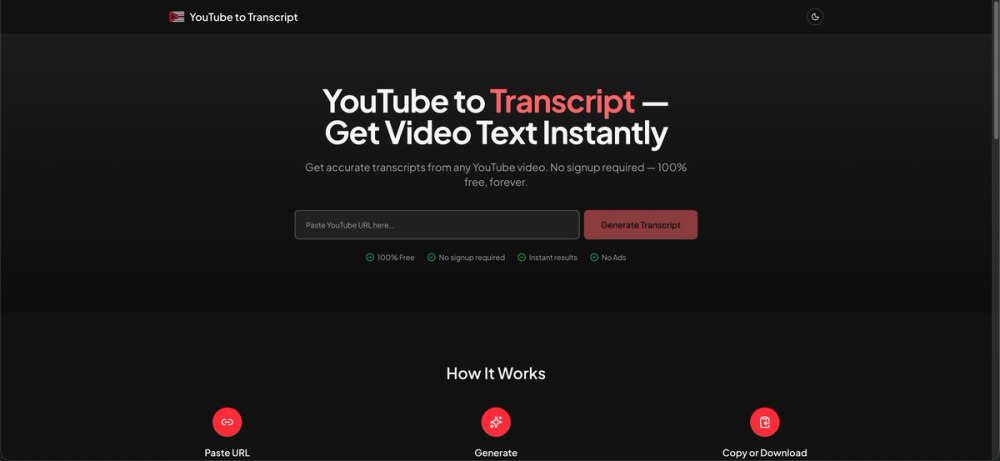
YouTube to Transcript is a powerful and completely free online tool designed to convert any YouTube video into a readable text transcript instantly. This service is ideal for a wide range of users, including content creators, students, researchers, and professionals who need to quickly extract text from video content. The platform emphasizes ease of use, accuracy, and accessibility, making it a go-to solution for transcribing YouTube videos without any hassle.
Key Features:
- Instant Transcription: Get accurate transcripts from any YouTube video in a matter of seconds. The process is streamlined to provide immediate results, saving users valuable time.
- 100% Free Forever: Unlike many other transcription services, YouTube to Transcript offers its full functionality completely free of charge. There are no hidden fees, premium tiers, or subscription requirements.
- No Registration Required: Users can start transcribing videos immediately without the need to create an account or log in. This eliminates barriers to entry and ensures a seamless user experience.
- Unlimited Usage: The tool imposes no limits on the number of transcripts users can generate. Whether you need one transcript or a hundred, the service is available without restrictions.
- Support for All Video Lengths: From short clips to multi-hour documentaries, YouTube to Transcript handles videos of any duration without imposing limitations.
- Extensive Language Support: The service works with all languages supported by YouTube, ensuring broad applicability for a global user base. Additionally, it offers one-click translation to over 100 languages, enhancing its utility for international users.
- Easy Copy and Download: Once a transcript is generated, users have the option to easily copy the text to their clipboard or download it as a
.txtfile for offline use or further processing. - No Ads: The platform promises a clean, ad-free experience, focusing solely on providing efficient transcription.
How It Works:
The process of obtaining a transcript is straightforward and involves three simple steps:
- Paste URL: Copy the URL of any YouTube video you wish to transcribe and paste it into the designated input field on the website.
- Generate: Click the "Generate Transcript" button. The system will then automatically process the video and extract its transcript.
- Copy or Download: Once the transcript is displayed, you can either copy the text directly to your clipboard or download it as a
.txtfile.
Use Cases:
- Content Creation: Bloggers and journalists can quickly turn video interviews or presentations into written articles.
- Education: Students can transcribe lectures or educational videos for study notes, research, or accessibility purposes.
- Research: Researchers can analyze spoken content from videos more efficiently by having it in text format.
- Accessibility: Provides text alternatives for hearing-impaired individuals or those who prefer reading over watching.
- SEO: Repurpose video content into blog posts or articles to improve search engine visibility.
- Language Learning: Learners can use transcripts to follow along with videos in new languages.
YouTube to Transcript stands out as a reliable, free, and user-friendly solution for anyone needing to convert YouTube videos into text. Its commitment to being 100% free, requiring no signup, and offering unlimited usage makes it a highly valuable tool in the digital landscape.