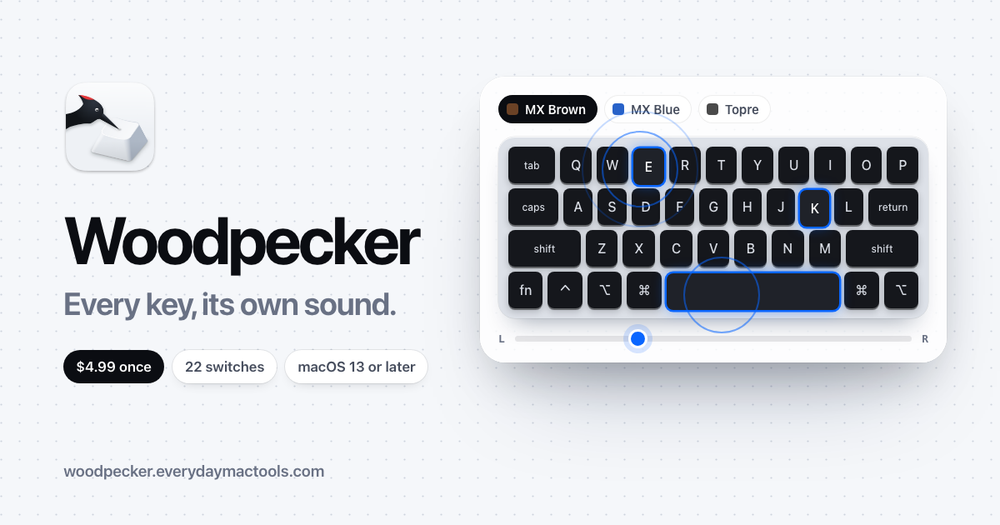
Woodpecker is a unique macOS menu bar application designed to bring the satisfying auditory experience of a mechanical keyboard to your Mac. It transforms your standard Mac keyboard into a vibrant soundscape, simulating the distinct clicks and clacks of various mechanical switches. The app is meticulously crafted to play a unique recording for every key press, with sounds intelligently panned based on the key's physical location on the keyboard, creating an immersive and realistic typing environment.
A standout feature of Woodpecker is its extensive library of 22 different mechanical keyboard switches. Users can choose from a wide array of popular switch types, including Cherry MX Brown, Blue, Black, and Red (available with both ABS and PBT keycaps), Topre, NovelKeys Cream, Holy Panda, Alpaca, Alps SKCM Blue, Buckling Spring, Everglide Crystal Purple, Everglide Oreo, Gateron Black Ink, Red Ink, Kailh Box Navy, and Zeal Tealios V2. Each switch type offers a distinct sound profile, ranging from tactile and clicky to linear, allowing users to personalize their typing feedback to their preference. The application even differentiates between "perKey" and "perRow" recordings for enhanced authenticity.
Beyond just playing sounds, Woodpecker offers advanced sound shaping capabilities. Users can fine-tune the audio experience with "Tone" and "Room" sliders. The "Tone" control allows you to adjust the sound from a deep, resonant thud to a bright, crisp click, while the "Room" slider simulates different acoustic environments, making the sound feel closer or more expansive. This level of customization ensures that the virtual mechanical keyboard sound perfectly matches your desired ambiance.
Privacy and discretion are core to Woodpecker's design. The app is engineered to be "quiet when it should be," ensuring a seamless and respectful user experience. It automatically silences itself when your microphone is active, preventing unwanted typing sounds from being broadcast during calls or recordings. Furthermore, Woodpecker intelligently mutes itself in password fields, safeguarding your sensitive information. For immediate control, a global mute shortcut (Control-Option-K) is available. Crucially, Woodpecker prioritizes user privacy by explicitly stating that it "records nothing you type," only listening for key presses to trigger sounds, not logging content.
Woodpecker is available for a one-time purchase of $4.99, offering a 24-hour free trial period to experience its features. A single license covers up to 3 Macs and requires macOS 13 or later, compatible with both Apple silicon and Intel processors. The app is lightweight, with a download size of approximately 34.1 MB. It requires Accessibility permission on macOS to detect key presses in other applications, but it only listens and cannot type or modify keys. While Bluetooth devices like AirPods may introduce a slight audio delay (150-250 ms), the app performs optimally on MacBook speakers with minimal latency (around 20 ms). Woodpecker provides a robust solution for Mac users seeking to enhance their typing experience with the satisfying sounds of a mechanical keyboard, combining extensive customization, thoughtful privacy features, and broad compatibility.