Virtual Hair Try On
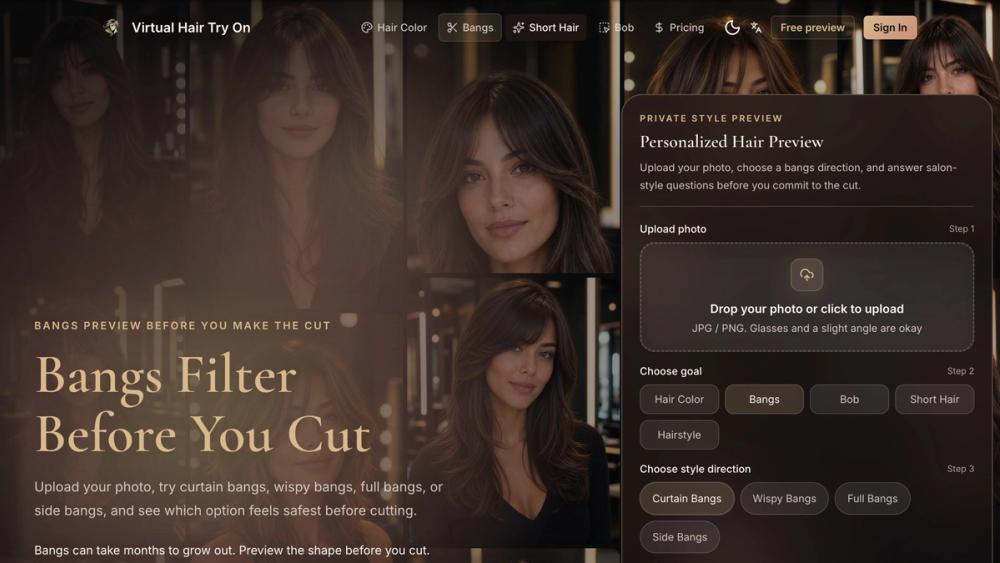
Virtual Hair Try On is an AI-powered web app that helps people explore a haircut, hair color, bangs, or styling direction on their own photo before making a high-commitment salon decision. Instead of relying only on model photos, users can preview a change on a recognizable version of their own face and save the result as a visual reference.
Why it exists
A haircut can take months to grow out, while professional color, highlights, or balayage can cost hundreds of dollars and may be difficult to reverse. Inspiration photos are useful, but they do not show how a particular length, fringe, color, or silhouette may look on the person considering the change. Virtual Hair Try On adds a practical preview step before the appointment.
The product helps answer questions such as:
- Would a bob, lob, or pixie cut suit me?
- Should I try curtain bangs, wispy bangs, or a fuller fringe?
- How might blonde, brunette, red, balayage, or highlights look on my photo?
How it works
- Upload one clear portrait with the current hair and face visible.
- Choose hair color, bangs, bob, short hair, or another hairstyle goal.
- Pick a style direction or describe a custom idea.
- Optionally add a hairstyle inspiration image.
- Answer salon-style questions about change level, maintenance, concerns, and priorities.
- Generate an AI preview designed to preserve identity while changing the hair.
- Compare the result, save it, or generate additional directions.
Guided questions add context about whether the user wants a subtle, noticeable, or bold change and whether maintenance, natural-looking results, or face framing matters most.
Key features
Hairstyle previews on your own photo
Test popular cuts and styling directions without installing an app. The browser-based workflow supports desktop and mobile use.
Hair color exploration
Preview blonde, brunette, red, black, balayage, highlights, and other color directions before scheduling a color service. The goal is a believable reference rather than a fantasy filter.
Bangs and short-hair tools
Dedicated flows cover bangs, bobs, lobs, pixie cuts, short layers, textured crops, and other high-commitment styles.
Salon-oriented decision support
The product asks what the user wants, what they are worried about, and how much daily styling they are comfortable with. Results can become a clearer starting point for a consultation instead of a vague request such as “make it shorter.”
Before-and-after comparison
Compare the original portrait with the generated direction and keep a favorite result as a salon or barber reference.
Who it is for
Virtual Hair Try On is useful for people preparing for a salon appointment, comparing hair colors, worrying about haircut regret, considering bangs or much shorter hair, or wanting a more personal reference than a celebrity photo. It can also help stylists and clients start a more concrete conversation.
The generated image is not a guarantee of the final salon outcome. It is a decision aid that can communicate intended length, shape, fringe placement, color direction, and overall mood more clearly.
Pricing and access
New users can start with one free watermarked preview after signing in. Paid try-on packs provide additional generations, clean downloads without a watermark, and more room to compare cuts, colors, bangs, and custom ideas. Paid try-on credits do not expire.
Getting started
Open Virtual Hair Try On in a browser, upload a clear portrait, select the change you are considering, and generate the first preview. No app installation is required. For the most useful result, use a well-lit photo where the current hairstyle, hairline, and face are visible, then treat the generated image as a reference to discuss with a professional stylist.