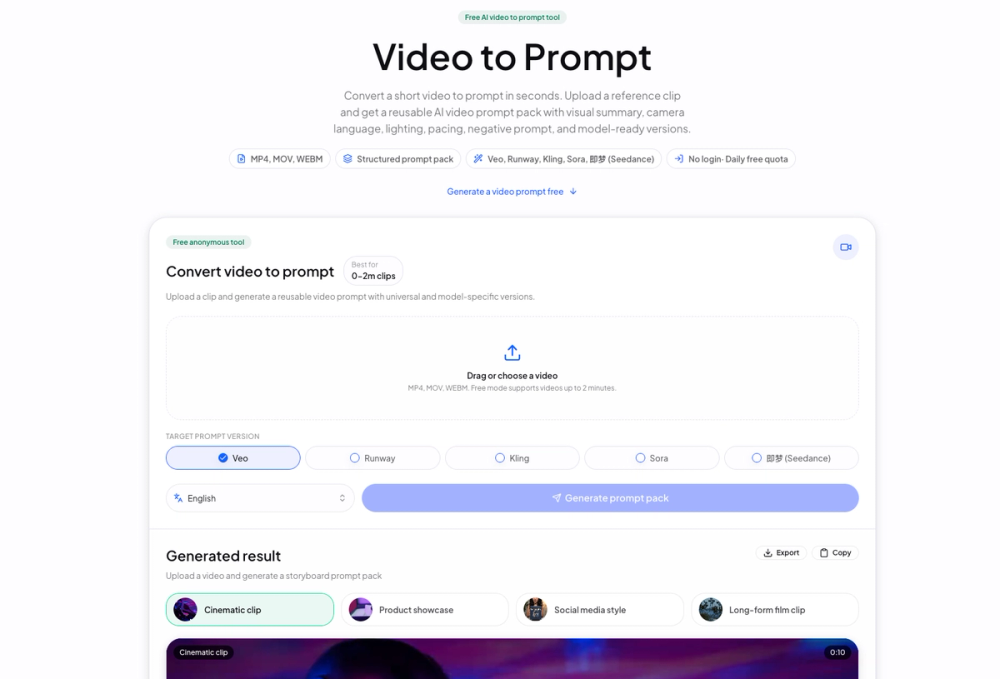
Video to Prompt is a free AI-powered tool designed to convert short video clips into comprehensive, reusable prompt packs for various AI video generation models. This innovative platform streamlines the content creation workflow by eliminating the need for manual analysis, screenshotting, and descriptive writing. Users can upload a short reference video (MP4, MOV, WEBM, up to 2 minutes in free mode) and instantly receive a structured prompt pack.
The tool's core functionality revolves around its advanced AI analysis, which meticulously extracts key visual and stylistic elements from the uploaded video. This includes a detailed visual summary, analysis of camera language, lighting conditions, pacing, and even suggestions for negative prompts to refine AI outputs. The generated prompt packs are versatile, offering both a universal prompt version and optimized, model-specific versions tailored for popular platforms like Veo, Runway, Kling, Sora, and 即梦 (Seedance).
Key features of Video to Prompt include:
- Comprehensive Prompt Packs: Each output contains a video description, a concise video summary, a universal prompt for broad application, and platform-specific prompts optimized for different AI models.
- Detailed Storyboard Prompts: For a granular approach, the tool provides a complete storyboard prompt, breaking down the video into shot-by-shot segments. Each segment includes details on duration, shot type, scene description, camera movement, color tone, visual elements, sound, transitions, and a specific prompt for that shot.
- Recommended Settings: To ensure consistency and quality, the prompt pack also suggests recommended settings such as aspectRatio (e.g., 16:9) and resolution (e.g., 720p) that can be applied alongside the generated prompts.
- Multi-language Support: While English is the default, the tool offers an output language selector, indicating support for other languages to cater to a global user base.
- Ease of Use: The free version requires no login, offering a daily free quota, making it accessible for quick, anonymous use.
The workflow is straightforward:
- Upload: Select a short video clip, which is securely uploaded directly to storage.
- Analyze: The AI video prompt generator processes the clip, identifying and extracting crucial elements like the subject, action, camera angles, lighting, overall style, and pacing.
- Copy: Users can then easily copy the universal prompt or choose a model-ready version tailored for their preferred AI video generation platform.
Video to Prompt serves a diverse range of creators and professionals:
- Short-video creators: Ideal for documenting subjects, camera work, and rhythm from social media clips, ads, or travel videos.
- Marketing teams: Quickly convert product demos and ad videos into reusable prompts for campaigns.
- Education and commerce: Summarize instructional videos, explainers, and product showcases into structured visual and style language.
- Research and archive: Transform reference videos into searchable and editable text structures for documentation.
Compared to manual breakdown or generic AI tools, Video to Prompt significantly reduces the time spent on prompt engineering. A manual breakdown can take 5-10 minutes involving pausing, screenshotting, organizing, and rewriting. Generic AI often provides plain text descriptions that lack specific visual details and require extensive reformatting for different platforms, taking 2-5 minutes. Video to Prompt completes this process in approximately 30 seconds, allowing creators to focus on fine-tuning prompts rather than scrubbing timelines.
For more extensive needs, an "Advanced" version is planned, which will offer long-video full breakdowns, require login, provide ordered shot records, saved job history, higher processing priority, and expor...