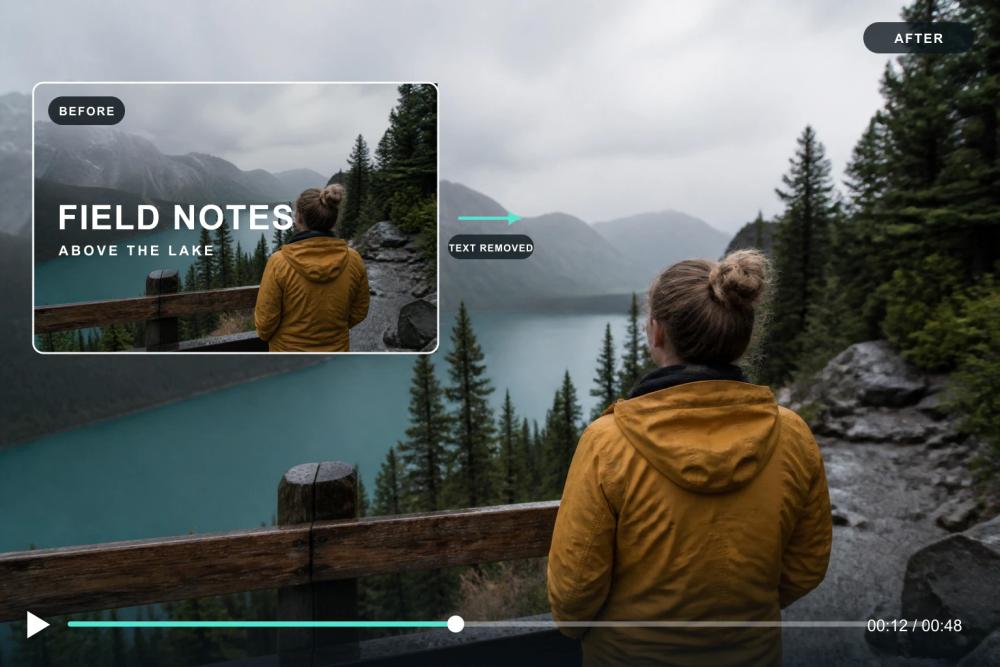
Video Text Remover is an advanced AI-powered online tool designed to effortlessly remove unwanted text, captions, subtitles, logos, and watermarks from videos. It utilizes sophisticated AI background reconstruction to deliver clean, blur-free results, making it ideal for content creators, video editors, and anyone needing to clean up their footage.
Key Features:
- AI-Powered Text Removal: Automatically detects and erases text, captions, and subtitles from any video frame by frame.
- Background Reconstruction: Unlike traditional methods that blur or crop, this tool intelligently rebuilds the background behind the removed text, matching colors, textures, and motion for natural-looking results.
- Versatile Use Cases: Specifically designed to handle various types of overlays, including burned-in subtitles, TikTok text, channel logos, stock preview watermarks, and screen recorder marks.
- Multiple Tools: Offers dedicated workflows for different removal needs, such as a general Video Text Remover, Remove Logo from Video, Remove Captions & Subtitles, Remove Watermark from Video, and TikTok Text Remover.
- Supported Formats: Compatible with popular video formats including MP4, MOV, and WebM, ensuring original resolution and frame rate are maintained without forced compression.
- User-Friendly Workflow: A simple three-step process: upload your video (up to 500MB), let the AI detect and remove text, then download your clean video without any added watermarks.
- Free Credits for New Users: Provides 30 free credits upon signing in, covering up to 30 seconds of Standard processing or 15 seconds of Advanced text processing, with no credit card required to start.
- Online & Browser-Based: Operates entirely in your browser, eliminating the need for software installation or plugins.
How it Works:
- Upload Your Video: Drag and drop your MP4, MOV, or WebM file into the upload box. The tool processes files up to 500MB directly in your browser.
- AI Detects & Removes Text: The AI scans every frame, identifies text regions (subtitles, captions, watermarks), and reconstructs the background behind them, ensuring no blur, ghosting, or patchy artifacts.
- Download, No Watermark: Once processing is complete, download your video in its original resolution and frame rate, free of any added watermarks or compression.
This tool is perfect for cleaning up TikTok clips for cross-platform sharing, stripping burned-in subtitles from stock footage, or removing accidental text overlays, saving hours of manual editing work.