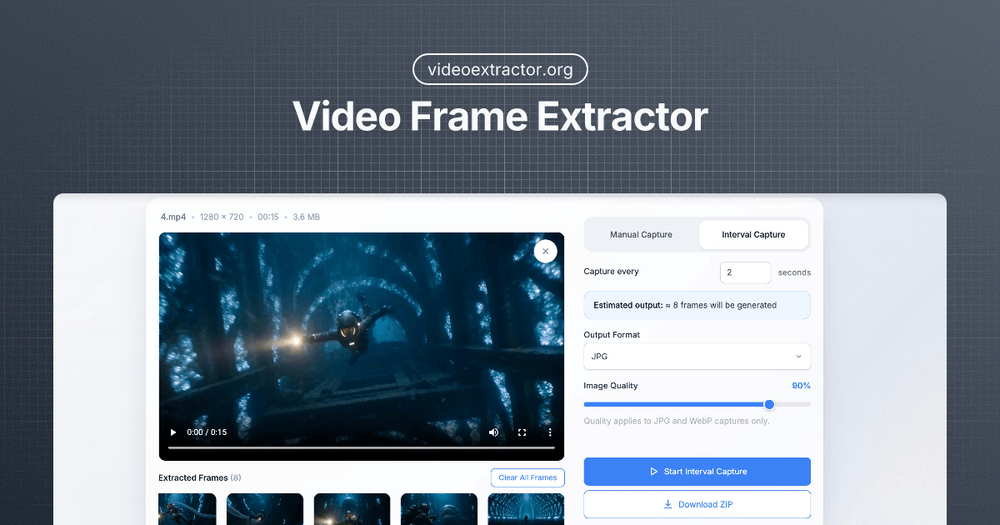
Video Frame Extractor is a powerful, free, and privacy-focused online tool designed to help users extract high-quality still frames from videos directly within their web browser. This innovative application ensures that all processing, from video decoding to image generation, occurs entirely on your local device, guaranteeing maximum privacy and security as your files are never uploaded to external servers. There's no need for sign-ups or payments, making it accessible for instant use.
The tool offers a seamless workflow for capturing precise moments from any video. Users can simply drag and drop their video file (supporting MP4, MOV, WebM formats) into the browser, and the application prepares it for extraction.
Key features and benefits include:
- Fast Frame Extraction: Optimized processing ensures minimal delays, providing a responsive workflow even for longer video recordings.
- Fully Local Processing: All operations are performed client-side, meaning your videos and extracted images remain on your device, offering complete data control and privacy.
- Flexible Capture Modes:
- Manual Capture: Allows users to precisely select and capture individual frames at specific playback moments.
- Interval Capture: Enables automatic extraction of frames at custom, predefined time steps, ideal for generating thumbnails, conducting video analysis, or reusing content.
- Adjustable Image Quality: For JPG and WebP formats, users can fine-tune the compression quality to achieve the desired balance between visual clarity and file size. The interface provides real-time updates on estimated file sizes, aiding in informed decisions.
- Export Frames as ZIP: The tool facilitates the bulk export of hundreds or even thousands of extracted frames by packaging them into a single, convenient ZIP archive, streamlining organization and download.
- Real-Time Output Estimation: Before initiating a large extraction, the tool provides an estimate of the number of frames and the total file size. This proactive feature helps users anticipate browser performance and adjust settings to prevent overload, making long captures more predictable.
The process is straightforward:
- Upload Your Video: Load your video file directly into the browser. The tool processes it locally without any server uploads.
- Choose Capture Settings: Select between manual or interval capture modes. Define the interval timing, desired output format (JPG, PNG, WebP), and image quality. The tool provides an instant preview of the estimated frame count and file size.
- Extract and Save Frames: Initiate the extraction to capture frames in real-time. Once completed, you can review the generated frames within the interface and download them all as a ZIP package.
Video Frame Extractor is an ideal solution for content creators, analysts, or anyone needing to grab still images from video content efficiently and securely, without the hassle of software installations or online accounts.