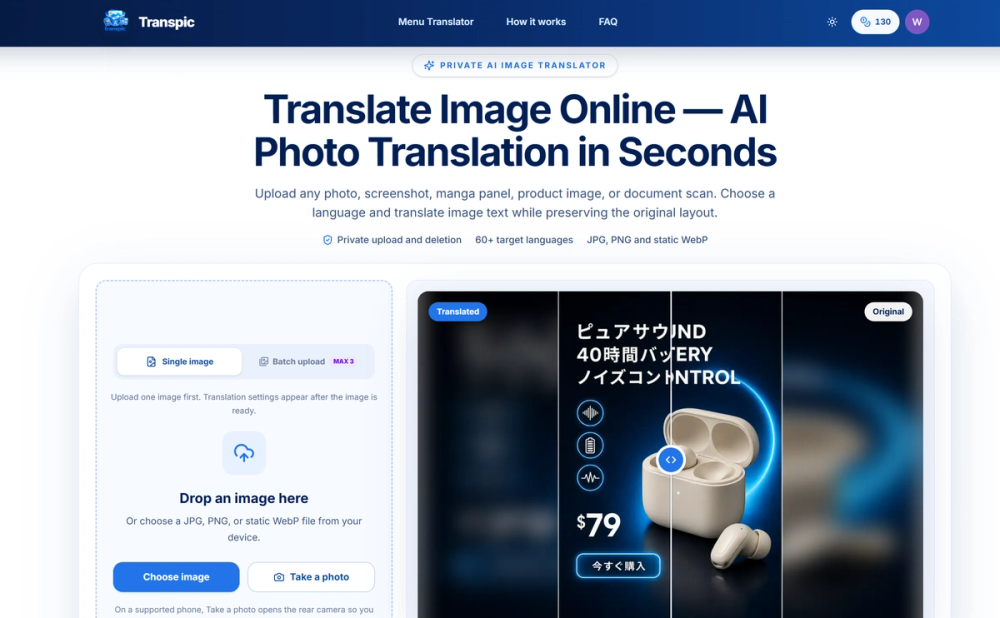
Transpic is an AI-powered online image translator designed to accurately translate text within photos, screenshots, manga panels, product images, and document scans while meticulously preserving the original visual layout and context. Unlike simple text extractors, Transpic ensures that translated phrases remain connected to their corresponding visual elements, such as menu prices next to dishes, product benefits near icons, or manga dialogue within speech bubbles. This layout-aware approach makes the translated output highly verifiable and visually coherent, crucial for both publication and everyday understanding.
The platform supports a wide array of visual formats including JPG, PNG, and static WebP files, making it versatile for various content types. It explicitly notes that direct PDF or Word file uploads are not supported, focusing instead on image-based content. Transpic emphasizes privacy, with uploads stored securely and processed without being published as permanent public assets. Users can review and edit translations directly within the editor, allowing for corrections in wording, resizing text blocks, adjusting colors, or repositioning text before final export.
Key features include:
- Private Image Processing: Uploads are handled with private storage and short-lived access URLs, ensuring your source images are processed confidentially.
- Layout-Aware Text Detection: The AI intelligently identifies text regions and their approximate positions, maintaining the visual relationship between translated text and the original graphic.
- Review and Edit Capabilities: Before downloading, users can open the translated image in an editor to make necessary adjustments to text, size, color, or placement.
- Extensive Language Support: Transpic offers translation into over 60 target languages, covering Asian, European, Middle Eastern, and African languages, streamlining multi-language projects.
The translation process is straightforward, involving four steps:
- Upload Image: Users drop a JPG, PNG, or static WebP file into the uploader.
- Choose Language and Mode: Select a target language and a specific mode (General, Product Graphic, Manga, or Document Screenshot) to optimize translation for the content type.
- Translate Image Text: The service detects text, translates it, and prepares positioned text blocks, showing real-time progress.
- Compare, Edit, and Export: Users can compare the original and translated images using an interactive slider, make edits, and then download the final graphic at the original dimensions.
Transpic caters to various specialized visual content needs with dedicated modes:
- General Mode: Ideal for photos, posters, menus, app screenshots, and signs with mixed text placement.
- E-commerce Graphics Mode: Perfect for localizing product headlines, feature callouts, prices, and promotional text while preserving the product's visual hierarchy.
- Manga Pages Mode: Designed to handle short dialogue, speech bubbles, and panel-based reading contexts, allowing for review before download.
- Document Screenshots Mode: Facilitates the translation of tables, forms, reports, and scanned pages as images, ensuring rows, columns, and labels are retained.
The platform offers a free tier with daily credits and watermarked exports, alongside paid plans (Starter, Pro, Studio) that unlock watermark-free exports, batch workflows, higher translation limits, and advanced features like custom prompts and all translation modes. This comprehensive approach makes Transpic a powerful tool for anyone needing precise, context-aware image translation.