Overview
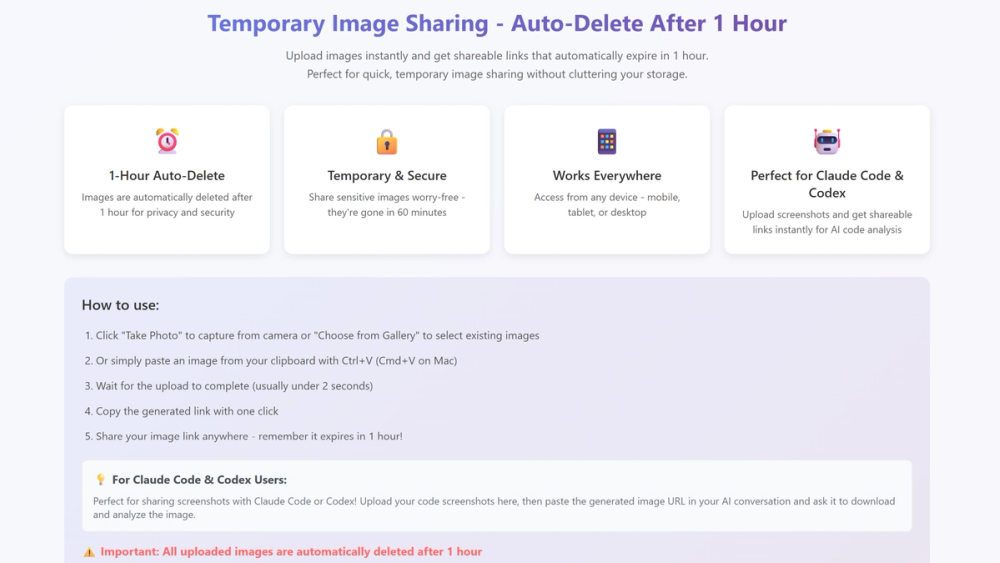
Tmper.app is a lightweight yet powerful tool designed to solve a common pain point for modern teams: quickly sharing screenshots without friction. Instead of attaching bulky files to chat apps or emails, Tmper instantly generates a secure shareable link for any image. It is especially useful for developers, designers, and remote teams who need to collaborate fast without breaking their workflow.
Key Features
- ⚡ Instant Links — Upload any screenshot and get a shareable link within seconds.
- 🔒 Privacy by Design — Every link expires in 1 hour, and all uploaded images are fully deleted from our servers after expiry. No permanent storage, no hidden tracking.
- 🌍 Cross-Platform — Works seamlessly on desktop and mobile.
- 🖼 Minimalist Workflow — Designed only for screenshot-to-link, with no extra noise.
- 🤖 AI Workflow Ready — Integrates smoothly into dev pipelines with Claude Code, Codex CLI, and Gemini CLI. Developers can paste links directly into AI sessions for faster debugging and collaboration.
Use Cases
- 👨💻 Developers — Share bug screenshots and log captures with teammates in seconds.
- 🎨 Designers — Send UI drafts or annotated visuals without exporting heavy files.
- 📄 Writers & PMs — Insert screenshots into documentation or specs with instant links.
- 📡 Remote Teams — Share visuals in Slack, Discord, or Notion without cluttering chat history.
- 🔬 AI-Assisted Debugging — Combine Tmper with Claude Code or Codex CLI to provide context for AI agents while troubleshooting.
Integration with AI Tools
Modern development often involves using AI copilots such as Claude Code, Codex CLI, or Gemini CLI. Tmper.app fits directly into these workflows: instead of uploading a screenshot manually, a developer can generate a Tmper link and paste it into the AI session. This makes it easier for AI tools to process context, analyze visual content, or collaborate with human teammates on debugging tasks. By bridging the gap between screenshots and AI workflows, Tmper saves valuable time.
Getting Started
- Capture a screenshot on your device.
- Drag and drop into Tmper.app or upload via mobile.
- Copy the generated link.
- Share it instantly with your team or paste into an AI coding assistant session.
No account setup is required for basic use, making onboarding effortless.
Pricing
- Free Plan — Upload images up to 5MB. Every link expires in 1 hour, and all data is permanently deleted from our servers after expiry.
Tmper.app is built to be the fastest and most privacy-friendly screenshot-to-link tool for modern teams and AI-powered workflows. Whether you are debugging code with Claude Code, reviewing design changes, or sharing product feedback across time zones, Tmper makes collaboration instant, secure, and effortless.