TextToPDF.net is a comprehensive online tool designed for seamless document conversion and text extraction. It allows users to effortlessly convert plain text into clean, professional PDF files, and conversely, extract editable text from existing PDF documents, including scanned pages using advanced Optical Character Recognition (OCR) technology. This free, secure, and user-friendly platform is built for everyday document management needs, ensuring privacy with temporary file handling.
Key Features:
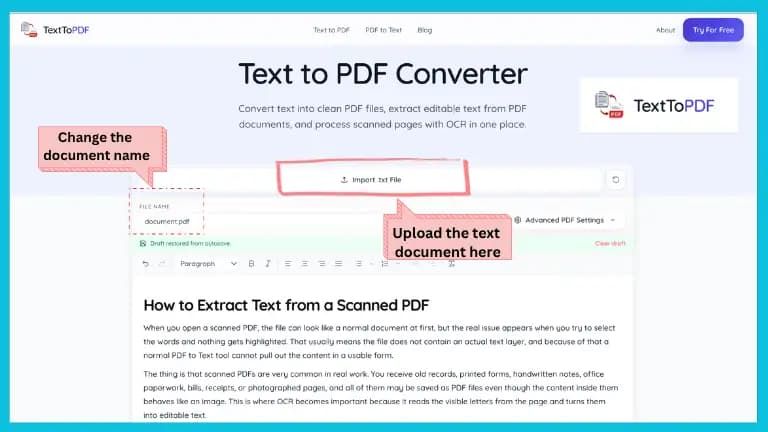
- Text to PDF Conversion: Transform typed content or text files into well-formatted PDF documents. The interactive editor provides rich text editing capabilities, allowing users to apply headings, adjust alignment, create lists, and manage paragraph formatting before final conversion. Advanced PDF settings offer control over page margins, font size, line spacing, and the addition of titles, authors, and footers for a polished output.
- PDF to Text Extraction: Quickly extract clean, editable text from digital PDF files.
- Scanned PDF to Text with OCR: Utilize robust OCR technology to process scanned PDF files and image-based documents, making previously unselectable text accessible and editable.
- Private and Secure Handling: Documents are processed with temporary handling, ensuring files are not stored longer than necessary, prioritizing user privacy and security.
- Intuitive Workflow: A clear, step-by-step process guides users from file upload or text input, through content structuring and advanced settings, to conversion/extraction, and finally, a preview before download.
How It Works:
- Choose Source: Upload a PDF for text extraction, import a text file for PDF creation, or paste content directly into the editor.
- Process Document: Create a PDF, extract text, or apply OCR based on the uploaded file type.
- Review & Download: Download the finished file or review the extracted text immediately after processing.
The platform's interactive editor allows for detailed content structuring, including changing heading styles, adjusting text alignment, and adding bullet or numbered lists. Users can also fine-tune PDF layout with advanced settings for margins, font sizes, and metadata. A crucial preview step ensures the final document meets expectations before download.
Use Cases: TextToPDF.net serves a wide range of users across various scenarios:
- Students: Convert notes into PDFs, extract text from academic documents, and reuse material for assignments.
- Office & Business Professionals: Create reports, extract text from shared PDFs for drafts or emails, and manage internal files efficiently.
- Content Creators & Writers: Prepare articles in PDF format, extract written material for repurposing, and streamline content workflows.
- Personal Use: Organize receipts, forms, notes, and saved pages into easily manageable and reusable formats.
TextToPDF.net aims to provide a unified solution for both document creation and text extraction, eliminating the need to switch between multiple tools and ensuring a consistent, efficient user experience.