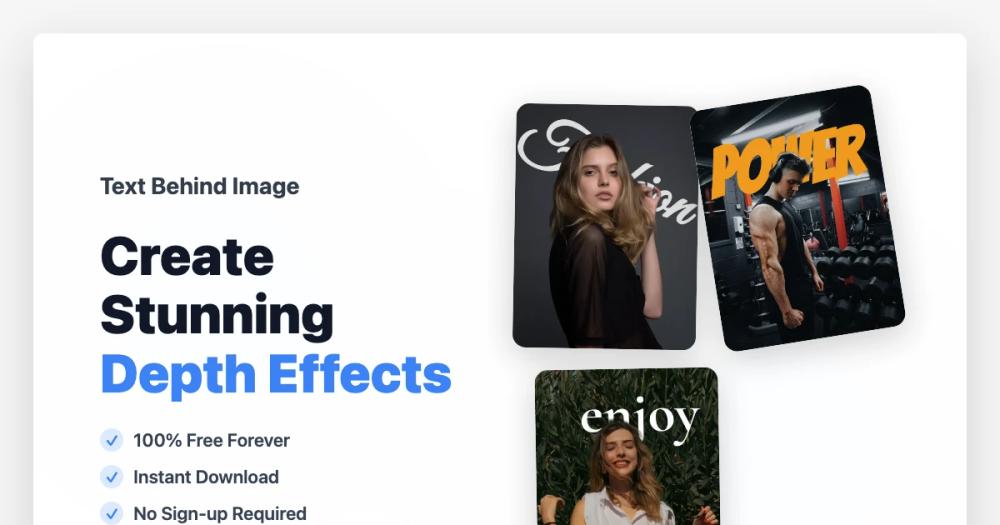
Text Behind Image is a powerful, free, and AI-powered online editor that allows users to effortlessly create stunning text-behind-image art. This innovative tool enables you to add text behind subjects in your photos, generating professional depth effects in seconds without any manual editing or design expertise. It's perfect for enhancing social media posts, designing eye-catching posters, or creating unique marketing materials.
The platform boasts a suite of robust features designed for ease of use and high-quality output. Its core strength lies in AI-Powered Object Detection, which automatically identifies objects and people within your uploaded images. This intelligent automation ensures seamless text placement, creating a natural depth effect where text appears to be layered behind the main subject.
Users have complete control over their typography with Custom Fonts & Text Styling. You can select from various font families, adjust text size, color, opacity, and rotation, and even add stroke effects to personalize your designs. For quick and professional results, Preset Font Collections offer carefully curated typography styles optimized for depth effects, applicable with just one click.
The Real-Time Preview & Editing functionality allows you to see changes instantly as you type and adjust, providing an intuitive design experience. You can drag to reposition, resize, and fine-tune every detail to achieve the perfect visual balance. Once satisfied, your creations can be downloaded in high-resolution PNG or JPG formats, ensuring crystal-clear quality suitable for both digital and print applications.
One of the most compelling aspects of Text Behind Image is its commitment to being 100% Free, No Watermark. There are no hidden costs, no subscription fees, and absolutely no watermarks on your downloaded images. Furthermore, no sign-up or account creation is required, making the tool accessible to everyone.
The process is streamlined into three easy steps:
- Upload Your Image: Simply select a photo (JPG, PNG, WEBP up to 10MB) from your device. The tool works best with images featuring clear subjects.
- Customize Your Text: Type your desired text, and the AI will automatically position it behind detected objects. Then, fine-tune its appearance using the comprehensive styling options.
- Download High-Quality Result: Instantly preview your final design and download it in high resolution, ready for any use.
Text Behind Image simplifies complex design tasks, making professional-grade image editing accessible to everyone, from beginners to seasoned designers looking for a quick and efficient solution.