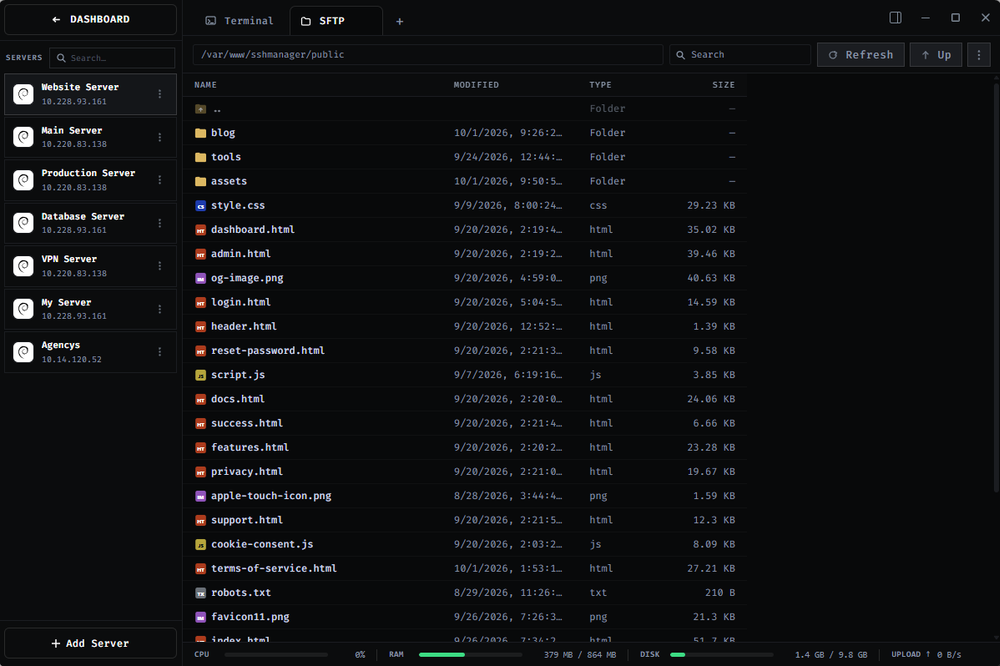
SSHFlow — Every server has its own workspace SSHFlow is a desktop SSH client designed around a simple idea: remote servers should be workspaces, not just terminal tabs. Traditional SSH workflows often involve switching between a terminal, SFTP client, code editor, monitoring tools, database applications, and log viewers. SSHFlow brings these common server-management tasks together in one organized interface. Key Features
- SSH Terminal — Connect to remote servers and run multiple terminal sessions.
- SFTP File Manager — Browse, upload, download, rename, and manage remote files.
- Remote Code Editing — Edit files on your server without constantly moving between applications.
- Server Monitoring — View CPU, RAM, disk usage, and uptime.
- Logs — Access server logs from the same workspace.
- Database Management — Work with databases alongside the rest of your server tools.
- Server Workspaces — Keep development, staging, production, VPS, and homelab servers organized separately. Who is SSHFlow for? SSHFlow is built for developers, VPS owners, homelab users, website developers, startup founders, and small teams who regularly work with remote Linux servers. It is especially useful if your current workflow involves constantly switching between several applications just to manage one server. Local-first approach SSHFlow is designed with server credentials and SSH keys in mind. Sensitive connection information is handled locally rather than requiring you to send your SSH credentials to a remote service. Getting Started Visit https://sshflow.com/ to learn more and download SSHFlow. The Windows version is currently available, with macOS and Linux support planned.