Sketchflow.ai is an AI-powered platform that allows users to turn ideas into multi-page structured web and mobile apps, offers AI-driven and manual editing tools, real-time simulation and code-ready outputs for web and mobile projects, no coding required.
Key Features
-
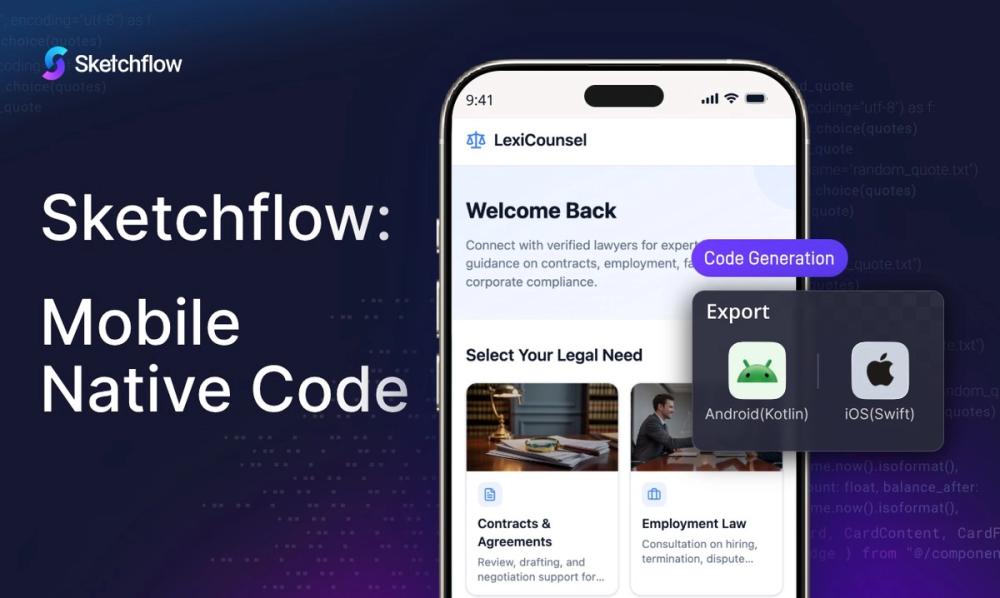
Native Mobile Code Generation: Most AI app builders generate web wrappers or cross-platform frameworks — Sketchflow generate Real Native Apps, Kotlin for Android, Swift for iOS.
-
Natural language processing: Describe your idea in natural language and Sketchflow generate it with one click.
-
All-at-once Generation: The only App Builder platform that empower users to generate full user journeys for UX - designs for interfaces - native code for development, all from one prompt.
-
Web app template library: Choose commercial, highly usable templates for different purposes for your project.
-
AI-assisted builder: Build your apps with Sketchflow.ai's smart AI Assistant. Just describe what you want.
-
Manual refinement: Manually adjust effects by selecting and modifying options and parameters.
Target Users
-
Small business&Solopreneurs: Swiftly validate, iterate, and preview complete projects from your ideas.
-
Product Teams: Showcase your ideas with fully structured product flows and prototypes.
-
Designers: Transform your design ideas into real-time, navigable prototypes faster, without any hassles.
Unique Selling Points
-
Pure Native Code: Providing users professional-grade output. Generate clean, modular native code built on a stable architecture with zero external dependencies.
-
Workflow Features: Enable users to refine the product flows before interfaces, follow the best UI/UX principles.
-
Project-level generation: Multi-page product instead of single screens, best suited for business ideas.
FAQ
Who uses Sketchflow?
Sketchflow is used by founders, product managers, designers, and no-code builders who want to create and build websites, apps more efficiently. It's especially popular among teams looking for an AI website builder that helps visualize product workflows and user flows before development.
How to use Sketchflow?
Using Sketchflow is no-hassle. Sketchflow lets you start with a simple prompt describing your website or product idea. The platform uses AI to generate structured, editable user flows, page layouts, and even code export. You can then visually edit and refine the product logic, make adjustments by selecting any elements to align your ideal views. After that, you can get the native code for your products, or even test your app in our simulator.
Is Sketchfow free?
Yes. Sketchflow offers a free plan that allows users to explore its core AI website builder and workflow features. Paid plans are available for users who need advanced capabilities such as more credits for AI-generation and larger-scale web app projects.