Welcome to sealsdigital
Stampdy is a simple, browser-based way to design custom stamps without learning complex design software or installing anything on your computer. It’s built for people who just want to open a page, create a clean, professional stamp, and download it in a format they can actually use. Whether you’re preparing official documents, invoices, certificates, or digital files, Stampdy bridges the gap between idea and finished stamp in a few straightforward steps.
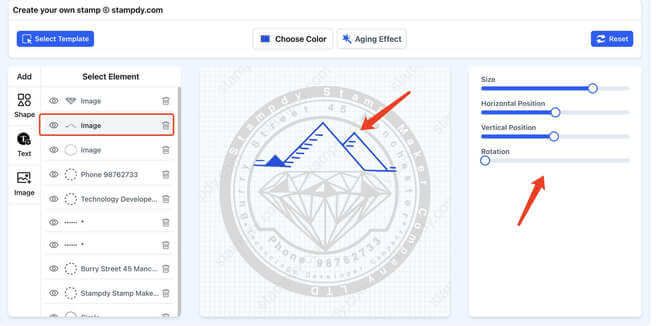
Instead of feeling like a technical tool, it’s meant to feel like a focused workspace: you choose a layout, add your text and logo, adjust the details, and see everything update in real time. The result is an online stamp maker that respects your time, keeps the interface uncluttered, and quietly handles the heavy lifting in the background.
A Focused Online Stamp Experience
At its core, Stampdy is about giving you full control over the look and feel of your stamp while staying out of your way. The editor runs entirely in the browser, so you can start designing from any desktop or laptop without an account or long setup. You aren’t forced into a single rigid style—Stampdy is flexible enough for simple one-line stamps as well as detailed circular company seals.
Because Stampdy is a dedicated online stamp editor rather than a general design suite, every option you see is there for a reason: shapes, borders, text tools, and logo placement are all tuned to the specific needs of stamp layouts. That focus is what makes it practical for everyday work instead of being just another nice-looking but overwhelming design app.
How the Online Stamp Maker Works
The workflow at Stampdy is intentionally straightforward. You start by choosing the general shape and style you want: round seals, rectangular business stamps, logo stamps, simple text stamps, or more decorative layouts. From there, you can add your own content—company name, registration number, address, website, or any message you need to appear on the stamp.
Text can be curved around a border, centered in the middle, or arranged in multiple lines, depending on the type of stamp you’re building. If you already have a logo or emblem, you can upload it and position it precisely where it belongs. The online stamp maker updates instantly as you tweak fonts, sizes, spacing, and alignment, so you always know what the final result will look like before you download anything.
When you’re happy with the design, you export it in practical formats. Vector files are there when you need sharp results for printing or production, while common image formats make it easy to drop your stamp into documents, slides, or digital workflows. The idea is that one design session should give you a file that works for both online use and physical manufacturing.
Who Stampdy Is For
Stampdy is built for people who have real work to do and don’t want to get stuck wrestling with software. Small businesses can use it to create company seals, paid and “received” stamps, address stamps, or official-looking marks for internal documents. Freelancers and self-employed professionals can quickly generate signature stamps, logo stamps, or approval marks to keep their paperwork consistent.
It’s also a practical fit for teachers, administrators, and organizations that need recurring, recognizable marks: library stamps, school seals, date stamps, and simple “approved” or “checked” layouts are all easy to assemble in minutes. Because the stamp maker lives online, teams can work from different locations but produce stamps with a consistent visual style, just by reusing the same base templates or design settings.