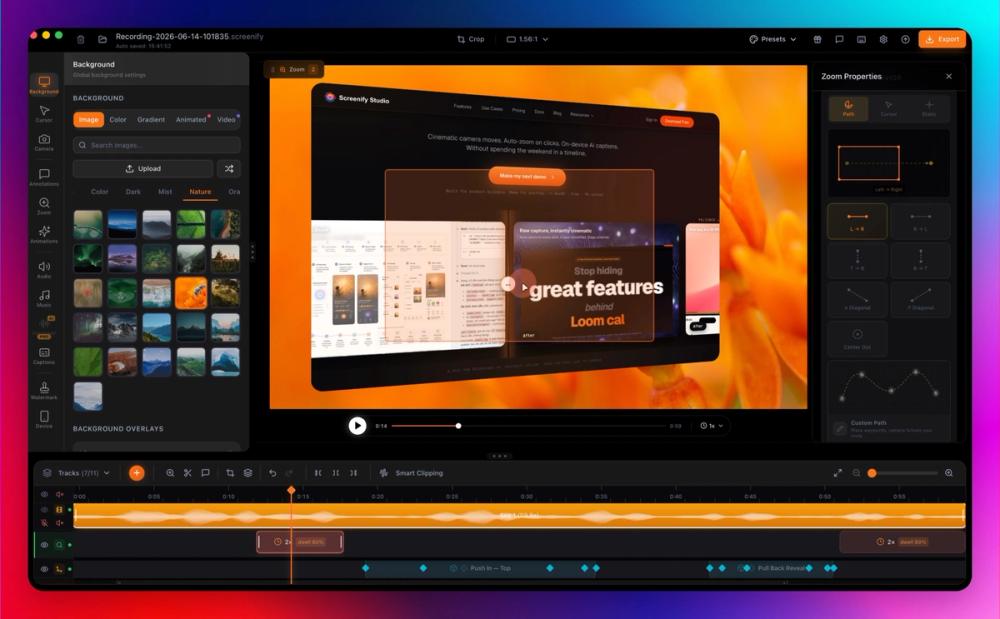
Screenify Studio is a powerful Mac screen recorder and device mockup studio designed for product builders, indie hackers, app developers, and solo founders who want to create polished, cinematic product demos without extensive editing. It transforms rough screen captures into professional-grade videos, staging them in realistic 3D iPhone or MacBook mockups.
Key features include:
- Cinematic Camera: Offers over 30 3D camera templates with multi-keyframe support, enabling professional dolly, pan-tilt, orbit, and crane movements. Users can also design custom camera paths with Bezier curves.
- Smart Auto-Zoom & Callouts: AI automatically detects clicks, typing, and mouse dwell to apply smart auto-zoom. It also provides 8 animated callout styles that combine zoom, dim, border glow, and 3D depth in one click.
- On-Device AI: All AI features run locally on your Mac, ensuring 100% privacy and offline functionality. This includes AI Background Removal (Neural Engine accelerated), AI Captions & Subtitles with word-level karaoke highlighting (Whisper-powered, 98%+ accuracy), and AI Translation to over 50 languages. AI Voiceover with zero-shot voice cloning is also available.
- Multi-Device Mockup Studio: Stage your app in photo-real 3D iPhone, iPad, or MacBook frames. The Multi-Device Stage allows combining two or three devices in one 3D scene with a single, keyframed camera path.
- Native macOS Performance: Engineered natively for Apple Silicon, leveraging Metal GPU and Neural Engine for 3x faster export speeds compared to Electron-based tools. The app is lightweight (80MB) and delivers 4K native export at 60fps with HDR.
- Comprehensive Editing Suite: Features a professional editor with 10+ specialized tracks for cuts, trims, and per-clip properties. It includes flexible recording modes (full screen, specific window, custom area, iOS Simulator, multi-monitor, multi-mic), Cursor Studio for customizable cursor effects, Keystroke Display, and Annotation Tools.
- Builder-Friendly Economics: Offers a robust free tier with unlimited recording and full editing capabilities (1080p export with watermark). Paid plans include a lifetime license option, removing subscription anxiety for long-term users.
- Automation: Supports CLI & AI Agent Automation for advanced workflows, allowing AI to film web apps from plain-English prompts.
Screenify Studio is ideal for creating feature demos for social media (X/Product Hunt), daily build-in-public clips, and bug fix walkthroughs, significantly reducing the "editing tax" by automating complex post-production tasks.