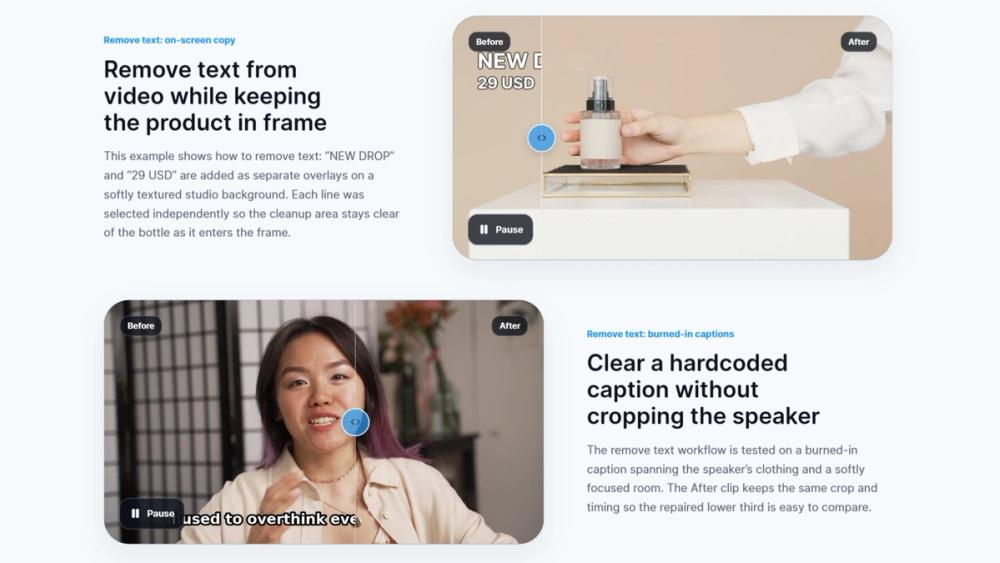
RemoveText.video is an innovative online tool designed to effortlessly remove unwanted text, hardcoded subtitles, captions, logos, and authorized watermarks from your videos. Leveraging advanced AI technology, this platform allows users to clean up video clips directly in their browser without the need for complex editing software. It supports popular video formats including MP4, MOV, and WebM, making it versatile for various content creators and editors.
The service offers both automatic detection and manual selection capabilities. For fixed text, subtitles, and captions, the AI can automatically identify and remove the elements. If the text moves or cannot be reliably detected, users can manually mark up to three target areas, providing precise control over the removal process. This flexibility ensures effective cleanup even for challenging scenarios like moving overlays.
Key features include:
- AI-Powered Removal: Utilizes artificial intelligence for smart detection and reconstruction of the background behind the removed text.
- Versatile Cleanup Modes: Offers specific modes for Text, Subtitle, Caption, Logo, and Watermark removal. Logo and Watermark modes provide options for "Basic blur cleanup" or "Advanced seamless cleanup" for superior results.
- Local Preview: Before any processing or upload begins, users can select a file to create a local browser preview, allowing them to inspect the clip and review the target area. This ensures satisfaction with the selection before committing to processing.
- Privacy-Focused: Automatic fixed-text detection runs privately in the browser on sampled frames. Video upload only starts after the user confirms processing, and temporary working copies are removed according to published retention controls.
- Supported Formats: Compatible with MP4, MOV, and WebM video files.
- Free Trial: Users can remove text from video online for free with 30 lifetime trial credits after Google sign-in, supporting up to 720p resolution.
The process is straightforward:
- Choose an MP4, MOV, or WebM file. A local browser preview is created.
- Select the type of text to remove (Text, Subtitle, Caption, Logo, Watermark) and use automatic detection or manually mark up to three areas.
- Review the target area, output resolution, frame-rate handling, and estimated credit quote.
- Sign in with Google if necessary, then choose "Process" to begin the upload and receive the finished video for download.
RemoveText.video is ideal for anyone needing to quickly and efficiently clean up video content, whether for personal projects or commercial use (depending on the plan and rights to the source material). It emphasizes ease of use, quality results, and user privacy, making it a powerful tool for video editing tasks.