Inspiration
Developers and learners often need to verify a binary, decimal or hexadecimal value, inspect a short byte sequence, or understand how a conversion works. Many tools return a number without showing the reasoning, while larger desktop utilities add more setup than this small task deserves. RadixLab was built to make these checks quick, readable and local.
What it does
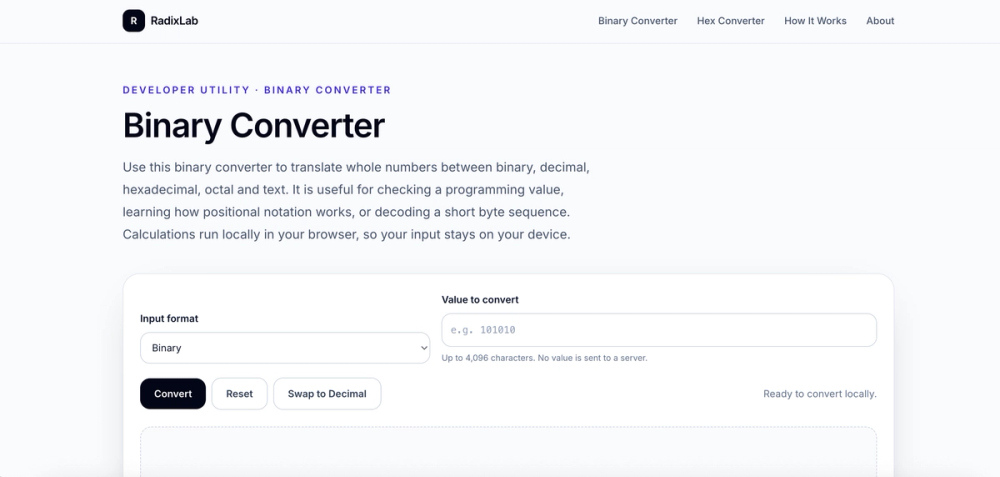
RadixLab converts binary, decimal, hexadecimal, octal and UTF-8 text in the browser. It shows related base results, examples and calculation steps for common directions such as decimal to binary and binary to decimal. Text conversion keeps UTF-8 byte groups visible, which helps explain why non-ASCII characters can use more than one byte.
Integer calculations use BigInt so large values remain exact. The input is processed locally in the browser; no account is required and the input is not uploaded.
How we built it
The site is built with TypeScript, React, TanStack Start and Vite, and deployed to Cloudflare Workers. The conversion engine uses BigInt for integer arithmetic and explicit UTF-8 byte handling for text. The public pages include focused routes for common conversion tasks, with examples, FAQs and structured explanations around the interactive tool.
Challenges and learnings
The main challenge was keeping integer output exact while also making text conversion understandable. A number and a byte sequence can look similar but represent different things, and leading zeroes matter when showing fixed eight-bit groups. We kept these cases visible instead of hiding them behind a single result.
RadixLab is intentionally focused: it is a small browser utility rather than a general calculator or a full developer platform. Feedback on signed values, fixed-width output, additional encodings and difficult UTF-8 cases would help guide the next improvements.