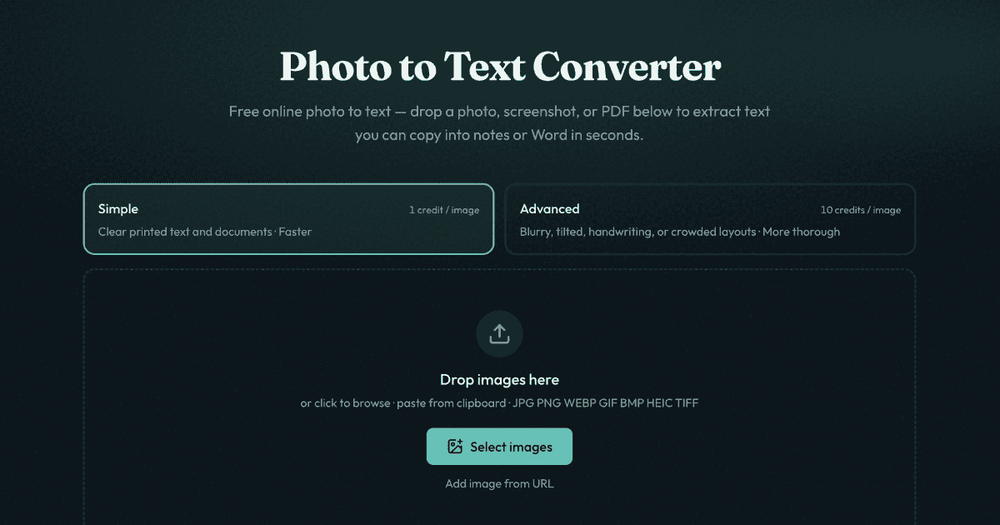
Photo to Text Converter is a free online tool that leverages advanced Optical Character Recognition (OCR) to extract text from various image and document formats. It allows users to quickly convert photos, screenshots, and PDF files into editable text, which can then be copied into notes, Microsoft Word, or Excel spreadsheets.
Key Features and Functionality:
- Effortless Text Extraction: Convert any photo, screenshot, or PDF into editable text with just a few clicks, eliminating the need for manual retyping.
- Versatile Input Formats: Supports a wide range of image and document types, including JPG, PNG, WEBP, GIF, BMP, HEIC, TIFF, and PDF, ensuring compatibility with most common files.
- Dual OCR Modes: Offers two distinct modes to cater to different needs:
- Simple Mode: Ideal for clear printed text and well-defined documents, providing fast and efficient text extraction.
- Advanced Mode: Designed for challenging inputs such as blurry photos, tilted pages, handwriting, crowded layouts, or complex tables, offering higher accuracy and more thorough processing.
- Seamless Integration with Office Tools: Directly copy extracted text into Word, Google Docs, or email. For more structured needs, dedicated converters are available to transform images into editable Word (.docx) or Excel (.xlsx, .csv, .tsv) files, preserving formatting, styles, headings, and tables.
- Specialized Converters: Beyond basic text extraction, the platform provides specific tools like:
- JPG to Word: Convert scanned documents, screenshots, and locked document photos into editable Word files, with options to insert images, plain text, or maintain Markdown styles.
- JPG to Excel: Extract data from receipts, screenshot tables, and paper sheets into organized rows and columns for easy editing and download.
- PDF to Text/Word/Excel: Comprehensive solutions for converting PDF content into various editable formats.
- OCR Model Exploration: Users can experiment with different OCR models like DeepSeek OCR and GLM OCR for layout-aware extraction, particularly useful for complex documents where structural integrity is crucial.
Use Cases:
- Digitizing Documents: Quickly convert physical documents, scans, and PDF pages into searchable and reusable text.
- Data Entry Automation: Extract data from receipts, invoices, and tables in photos directly into Excel, saving significant time on manual data entry.
- Unlocking Screenshots: Copy text from screenshots where direct selection is disabled, making information accessible.
- Academic and Professional Work: Efficiently transfer text from research papers, lecture notes, or reports captured as images into editable formats for further analysis or editing.
This free online tool is designed for both casual users needing a quick text copy and professionals requiring structured document conversion, offering a robust solution for turning visual information into actionable text.