Newsletter
Join the Community
Subscribe to our newsletter for the latest news and updates
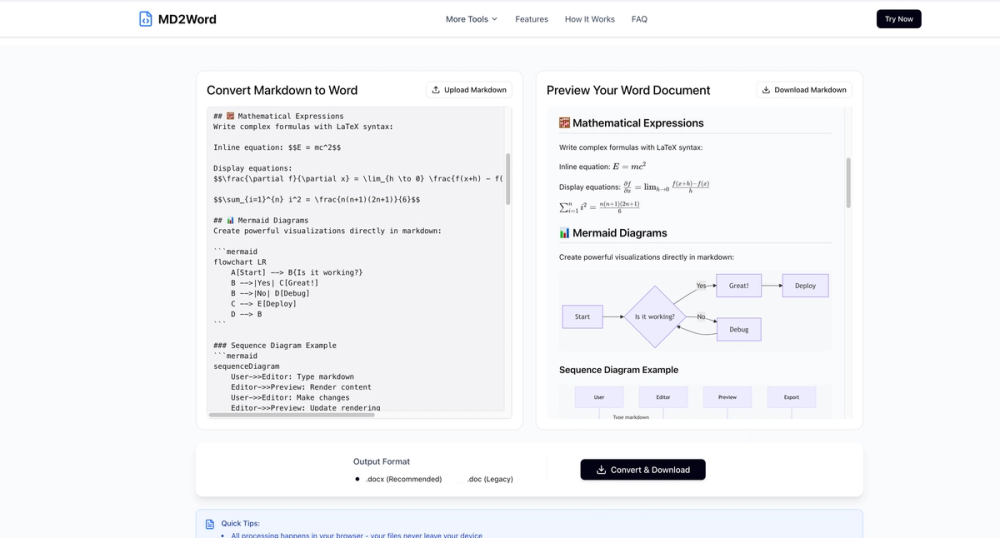
Convert Markdown to Word with full GFM support, including footnotes, GitHub alerts, tables, LaTeX, Mermaid, images, emojis, code blocks, links, and more.

ProductFame is a product launch platform that helps users discover popular products and helps founders gain real feedback, early traffic, and valuable...
Markdown to Word — Fast, Private, and Professional Conversion
I. Product Overview
Markdown to Word (https://markdowntoword.pro) is a fast, free, browser-based tool that converts Markdown (.md) files into polished Microsoft Word documents (.docx / .doc) in seconds.
No software installation. No account required. No file uploads.
All conversions run entirely in your browser, delivering maximum speed, complete privacy, and zero friction.
II. Core Features
Convert Markdown (.md, .markdown) files to Word (.docx or .doc) instantly
Upload a file or paste Markdown content directly into the editor
One-click export with no configuration needed
See a live preview of your document as you type or upload content
Verify formatting before downloading to ensure accurate output every time
Supports GitHub Flavored Markdown (GFM)
Preserves:
Headings and lists
Code blocks and inline code
Tables and task lists
Images and emojis
LaTeX math formulas
Footnotes and complex nested structures
Converts Markdown into native Word elements while maintaining layout fidelity
Export as .docx (modern Word format)
Export as .doc for legacy compatibility
Works seamlessly with all major versions of Microsoft Word
All processing happens locally in your browser
No file uploads, no cloud storage, no tracking
Your documents never leave your device
III. Why Choose Markdown to Word?
⚡ Fast & Effortless
Convert Markdown to professionally formatted Word documents in seconds—no setup, no plugins, no waiting.
🔐 Privacy by Design
Your content stays on your device at all times. Perfect for confidential documents, internal reports, and proprietary content.
📄 Professional Output
Generate clean, collaboration-ready Word files suitable for business documents, technical reports, academic papers, and client deliverables.
🌍 Free & Cross-Platform
Works on Windows, macOS, Linux, iOS, and Android—directly in your browser. No sign-up. No limits.
Start Converting Today
Turn your Markdown into beautiful Word documents—100% free, fast, and privacy-focused.
👉 Try it now at https://markdowntoword.pro