Overview
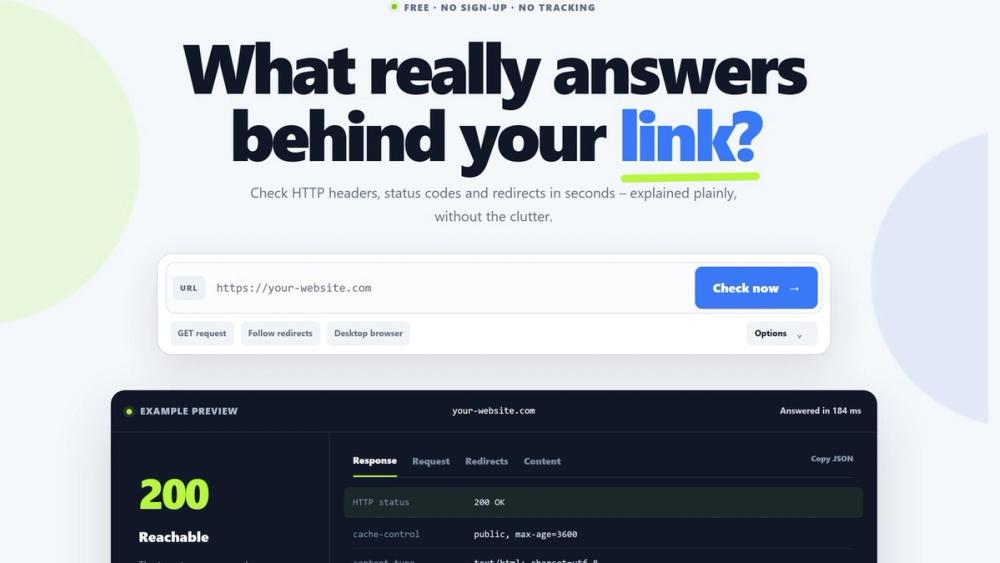
LinkSniffer answers one question thoroughly: what does the server behind this address actually reply? A link can look perfectly fine in a browser and still hide a chain of redirects, a 410 Gone, a consent bridge that never forwards, or an affiliate hop that quietly lost its tracking parameter. Screenshots do not show that. HTTP headers do.
The check runs server-side, not in your browser. LinkSniffer follows the chain step by step, up to 20 hops, and records each one separately instead of collapsing it into a single result. That difference matters whenever a link misbehaves: you see which hop changed the status code, which one dropped a query parameter, and where the journey really ends.
Key Features
Every redirect hop on its own. Status code and the complete target URL including path and query, not just the hostname, because the deeplink and the affiliate ID live there.
Redirects that are not in the header. Meta refresh and Refresh headers are followed; JavaScript jumps found in the source are reported as detected, never silently followed. A 200 is not proof that you reached the destination.
Desktop, mobile or Googlebot, with GET or HEAD. Some servers answer differently per user agent, and only the comparison makes that visible. Full response headers come with a preview of the response body, without opening the page.
API and MCP. A free REST API and a remote MCP server over Streamable HTTP run the same check from your code or from Claude, Cursor and other MCP-capable assistants.
Link monitoring. Watch a URL and get an event when its status code, final destination, number of redirects or detected script targets change. A change counts only after a second check confirms it, and rotating click IDs in tracking chains are ignored by default. Notifications arrive as an Atom feed, as a signed webhook, or through API and MCP.
Use Cases
Affiliate and deal publishing. Confirm that a click really arrives at the right shop with the partner ID intact, and get told when a campaign link starts pointing somewhere else.
SEO and migrations. Check redirect chains after a relaunch, tell 301 from 302 and 404 from 410, and find hops that were added by accident.
Development and CI. Verify status codes and destinations from your own scripts through the API instead of clicking through them by hand.
Support and editorial work. Understand within seconds why a link behaves strangely for some visitors and not for others.
Getting Started
Open linksniffer.de, paste a URL, read the answer. No account, no sign-up. For the API and the MCP server, get a free key at linksniffer.de/entwickler; it takes an e-mail address and a click in the confirmation mail. The MCP server lives at linksniffer.de/mcp and works in any client that supports remote MCP over Streamable HTTP; the checking tools even work without a key.
Pricing and Plans
The web tool is free and needs no account. The API, the MCP server and link monitoring are free during the beta: 1,000 checks per day and 10 monitored URLs per key. A free tier will remain afterwards, and any paid plans will be announced at least 30 days in advance. LinkSniffer is available in German and English, sets no cookies and loads nothing from third-party servers.