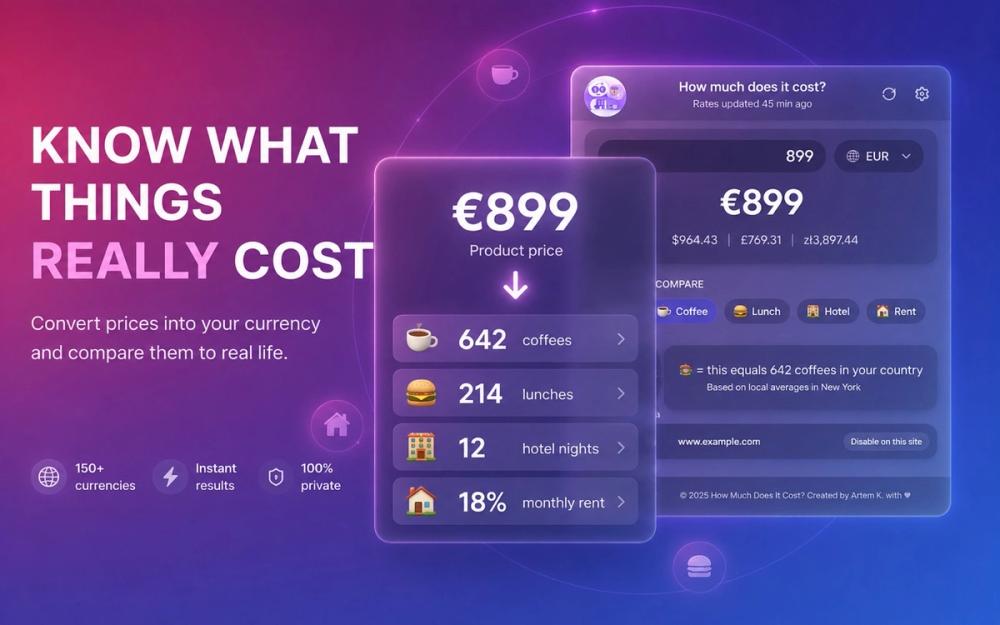
How Much Does It Cost? is a privacy-first Chrome extension that fundamentally changes how you see prices online. Instead of giving you a single number in a foreign currency, it answers the real question: "Is this a good deal for me, right here, right now?"
Once installed, the extension silently scans every webpage you visit — Amazon, eBay, Etsy, Booking.com, Airbnb, Shopify stores, or any site that displays prices. It automatically detects prices in any format ($50, 100€, 5000¥, 10000₽, ฿, and 50+ currencies including crypto) using a sophisticated regex engine and DOM scanner. No configuration needed — it just works.
Hover over any price and a beautiful glassmorphism tooltip appears with everything you need to make an informed decision:
• Instant multi-currency conversion — see the price in all your preferred currencies at once (50+ supported, rates updated daily) • Real-world context — that €180 jacket isn't just a number. It's ≈ 15 coffees, 3 lunches, or 0.2 months of rent in your city. The extension uses real cost-of-living data to ground every price in something you actually understand. • Hours of work — set your hourly rate once and any price becomes "≈ 4h of work." This single feature changes how you think about spending forever. • Draggable, pin-able, with light/dark theme
The extension supports 8 languages (English, Spanish, French, German, Russian, Japanese, Chinese, Korean), works on any site, and can be set to trigger on hover or click.
Premium ($9.99 one-time, lifetime) adds: personal savings goals tracking, custom comparison categories (gym memberships, subscriptions — anything you define), and smart budget alerts when a price exceeds your monthly income threshold.
No accounts. No sign-ups. No tracking. Everything runs 100% locally in your browser. Your browsing data never leaves your device.