LogoToolFame
  • Category
  • Blog
  • Pricing
  • Submit
LogoToolFame

Newsletter

Join the Community

Subscribe to our newsletter for the latest news and updates

LogoToolFame

ToolFame - Popular Online Tools Directory

X (Twitter)
Made with❤️byHyhor
Product
  • Submit
  • Pricing
  • Category
Explore
  • Tag
  • Blog
  • Collection
Contact
  • Twitter
  • Email
More
  • About Us
  • Privacy Policy
  • Terms of Service
  • Sitemap

Quick Links - Explore more trending tools & products

  • AI Tools
  • Video Tools
  • Audio Tools
  • Image Tools
  • Animation Tools
  • 3D Tools
  • Writing Tools
  • Data Analysis Tools
  • Social Media Tools
  • Productivity Tools
  • Content creation Tools
  • Directories Tools
  • Development Tools
  • Freelancer tools Tools
  • Boilerplates Tools
  • Remote work Tools
  • Design Tools
  • Chatbot Tools
  • Daily Life Tools
  • Community Tools
  • Legal Tools
  • Finance Tools
  • E-commerce Tools
  • Marketing Tools
  • SEO Tools
  • Health Tools
  • Research Tools
  • Education Tools
  • Translation Tools
  • Monitoring Tools
  • Management Tools
  • Inspiration Tools
Featured on ProductFameFeatured on aitoolfame.comFeatured on saasfame.comFeatured on toolfame.comFeatured on directoryfame.comFeatured on findly.toolsFeatured on Startup FameListed on Turbo0Featured on Dofollow.ToolsFazier badgeFeatured on Twelve Tools
Copyright © 2026 All Rights Reserved.
  1. Home
  2. Category
  3. Design
  4. HexaCalc

HexaCalc

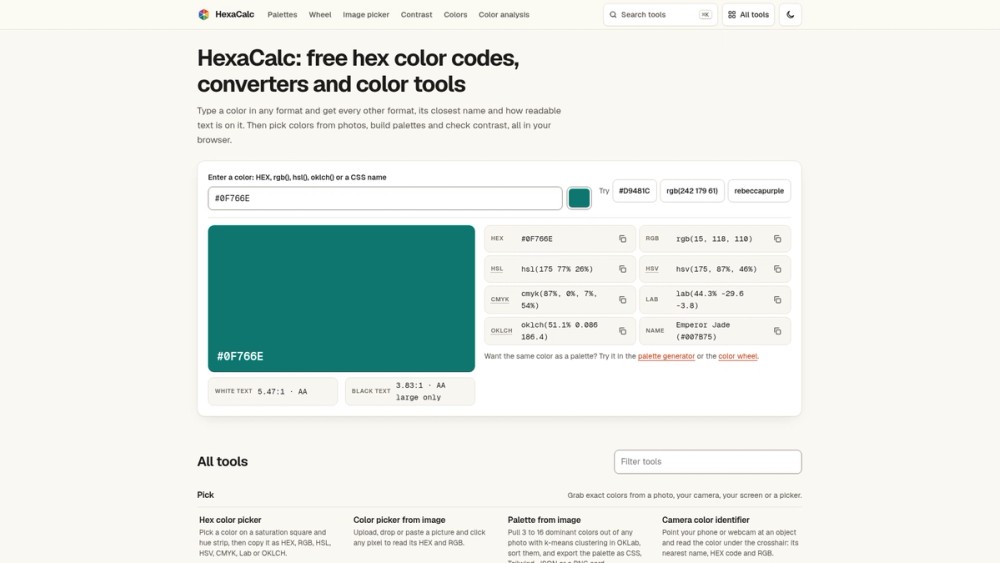
Free color tools in your browser: generate palettes, pick colors from photos or your screen, check contrast, and convert hex, RGB, HSL and CMYK. No sign-up.

Visit Website
image of HexaCalc
Visit Website

Introduction

Overview

HexaCalc is a free set of color tools that runs in your web browser. Type or pick a color and HexaCalc shows it in every common format, tells you its closest name, and shows how readable text is on top of it. There is nothing to install and no account to create.

Key features
  • Color converter. Enter hex, RGB, HSL or CMYK and see the other formats at once, ready to copy.
  • Closest color name. Every color gets a plain-language name.
  • Contrast checker. See how readable text is on a background, with pass or fail results for normal and large text.
  • Palette generator. Build a palette around one color and adjust it to fit your project.
  • Shades and gradients. Make lighter and darker variations, or blend two colors into a gradient.
  • Color picker from a photo. Upload an image and grab colors from it.
  • Screen color picker. Pick a color from anywhere on your screen when your browser supports it.
  • Color blind test. Preview how a color or palette looks with different kinds of color vision deficiency.
Who it is for

Designers can explore palettes and check readability. Front-end developers can convert a hex code into RGB, HSL or CMYK and check contrast before shipping. Students and teachers can see how color models relate to each other. Marketers, bloggers and small business owners can pull colors from a logo or product photo and reuse them across posts, slides and websites. Accessibility reviewers can run quick readability and color vision checks.

Use cases
  1. Match a brand hex code to the CMYK value a printer needs.
  2. Check that button, banner or slide text is readable on its background.
  3. Build a palette from a photo with the mood you want.
  4. Generate shades for hover states, borders and backgrounds.
  5. Create a gradient and copy it into your stylesheet.
  6. Test a palette for color blindness and fix colors that look too similar.
Getting started

Open hexacalc.com in any modern browser and type a color. The page shows every format, the closest name and a readability check right away. From there, follow the links to build a palette, make shades or a gradient, run the color blind test, or pick colors from a photo. Every result can be copied with a click.

Pricing

HexaCalc is free to use, with no sign-up and no paywall. It is made by Ahmed Zaki, launched in 2026, and is not an AI product: results come from standard color math for conversion and contrast ratio.


Back

Information

  • Publisher
    Ahmed ZakiAhmed Zaki
  • Websitehexacalc.com
  • Published date2026/10/18

Categories

  • Design

Tags

  • Free
  • Web
  • Beginner
  • English Supported
image of ProductFame
Sponsored
MarketingSEODirectories

ProductFame

ProductFame is a product launch platform that helps users discover popular products and helps founders gain real feedback, early traffic, and valuable...

More Products

image of BlockPoster.ai
ImageAIDesign
Visit Details

BlockPoster.ai

Details

Make a block poster from photos or AI art. Crop, split and preview for free. Download basic PDFs or unlock HD, watermark-free prints.

WebFreePaidAIEnglish Supported
image of OldRoll
ImageContent creationDesign
Visit Details

OldRoll

Details

Transform your photos with Digicam, Film, Y2K, 90s, VHS, and Dreamy retro effects. Fine-tune the light, color and texture, all in your browser.

WebFreeAndroidiOSEnglish Supported
image of Muse Image
AIImageDesign
Visit Details

Muse Image

Details

Muse Image is an AI image editor and AI Art Generator for text to image creation, image to image edits, reference-guided visuals, and fast photo refinement.

AIWebFreePaidProfessional