Overview
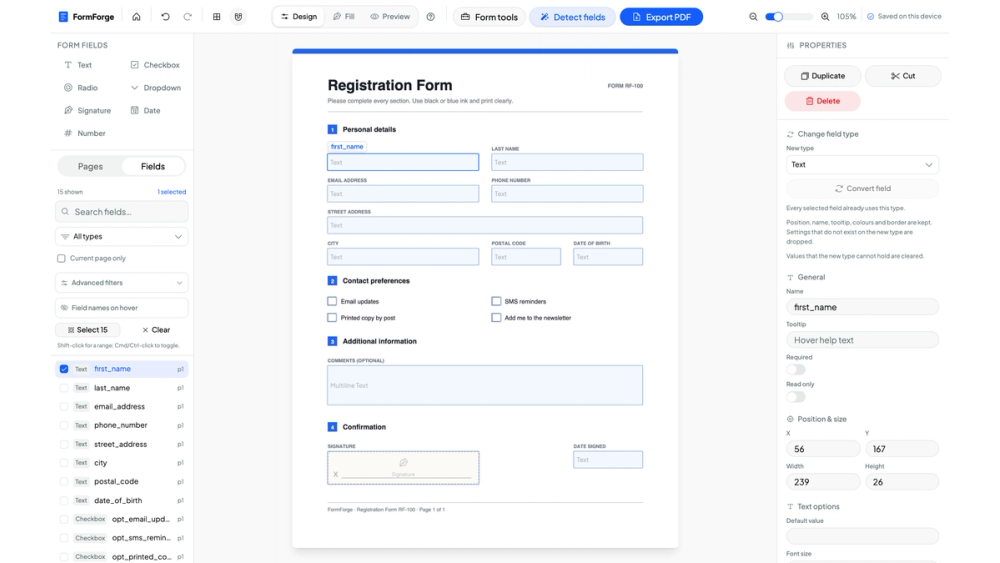
FormForge turns a flat PDF into a fillable one without leaving the browser. Load a document and press Detect fields: it looks for the places a reader is meant to write — ruled lines, boxes, dotted underscores — and proposes fields there. From that starting point you move, resize, rename, retype or delete anything, and add the ones it missed by hand.
Key features
- Field types: text, checkbox, radio, dropdown, signature, date and number.
- A properties panel per field for its name, tooltip, required and read-only flags, exact position and size, default value and text options.
- Three modes. Design places and adjusts fields, Fill lets you type into the form you just built, Preview shows it as a reader will meet it.
- AcroForm checks with one-click fixes for the structural problems that make a PDF open badly in one reader and fine in another.
- Signatures drawn, typed or cryptographic.
Use cases
The recurring small chore of being handed a PDF that was clearly designed to be printed and signed — an intake form, a rental application, a school permission slip — and wanting to fill it in properly instead of printing, writing and scanning. Also useful for turning an existing document into a form other people can complete and return.
Getting started
Open the site and drop in a PDF. There is no account to make and nothing to install. Drafts are kept in the browser's own storage; the header simply reads "Saved on this device". The export is an ordinary AcroForm PDF that opens and fills in Acrobat, Preview, Chrome, Firefox and mobile PDF apps, with no dependency on FormForge afterwards.
Privacy
The PDF is parsed and rewritten inside the tab and is never uploaded, so the tool works offline and documents holding personal or contractual content stay on the machine they came from.
Pricing
Free.