🔥FLASH SALE: 30% OFF everything!
LogoToolFame

ExcelCompare

ExcelCompare.org is a free, privacy-first tool designed to solve the biggest headache in data analysis: spotting differences between two Excel files.

Introduction

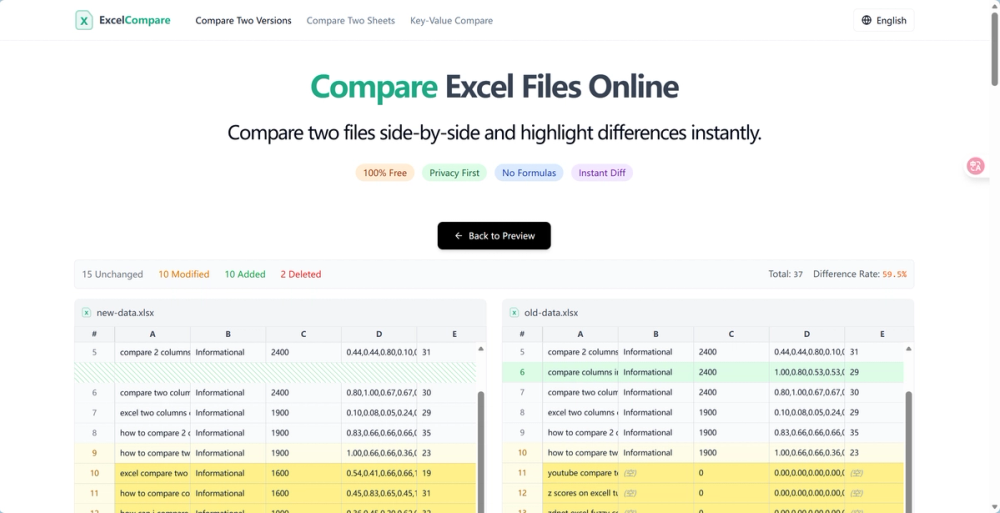
ExcelCompare is a web-based tool that compares two Excel or CSV files side-by-side. It synchronizes your scrolling and highlights differences visually (Red for deletions, Green for additions, and Blue for modifications). It’s built for speed and, most importantly, for privacy.

Key Features
  • 100% Private & Secure: This is the big one. The tool processes files locally in your browser using JavaScript. Your data never leaves your computer and is never stored on their servers. For anyone in finance or HR, this is non-negotiable.
  • Visual Diff Highlighting: It automatically color-codes changes. You don't have to hunt for them; they pop off the screen.
  • Smart "Key-Value" Comparison: This is a killer feature (shown on their "Key-Value Compare" page). If you have two lists that are sorted differently—say, an Invoice ID list—you can tell the tool to match rows based on that "Key" (ID) column. It acts like an instant VLOOKUP for your whole sheet, showing you which values changed for that specific ID.
  • Format Support: Works seamlessly with .xlsx, .xls, and .csv.
  • No Installation Required: It’s just a website. No IT approval needed, no suspicious .exe files to download.
Use Cases: When to Use This?

I use this almost daily for specific tasks:

  1. Financial Reconciliation: Quickly comparing a ledger export against a bank feed to spot missing transactions.
  2. Version Control: checking what a colleague changed in a shared file before I merge it into my master sheet.
  3. Inventory Management: Uploading an old stock list vs. a new one to instantly see which SKU counts have shifted.
  4. Cleaning Data: Identifying duplicate rows or "orphaned" records that exist in one file but not the other.
Why It Beats Standard Methods
  • vs. Manual Checking: It saves hours and eliminates human error.
  • vs. VLOOKUP/XLOOKUP: Formulas are great, but they are prone to breaking if you drag them wrong, and they make your file heavy. This tool visualizes the data without altering your actual files.
  • vs. Paid Software: Most enterprise comparison tools cost a fortune. This offers the core functionality you actually need for free.
Getting Started

It is incredibly simple to use:

  1. Go to the website https://excelcompare.org.
  2. Drag your "Original" file into the left box and your "Modified" file into the right box.
  3. The comparison loads instantly.
  4. If your data is messy (unsorted), switch to the "Key-Value Compare" tab to match rows based on a unique ID column. If you are tired of the manual grid-stare, give this a try. It’s the fastest way to validate your data without the headache.

Newsletter

Join the Community

Subscribe to our newsletter for the latest news and updates