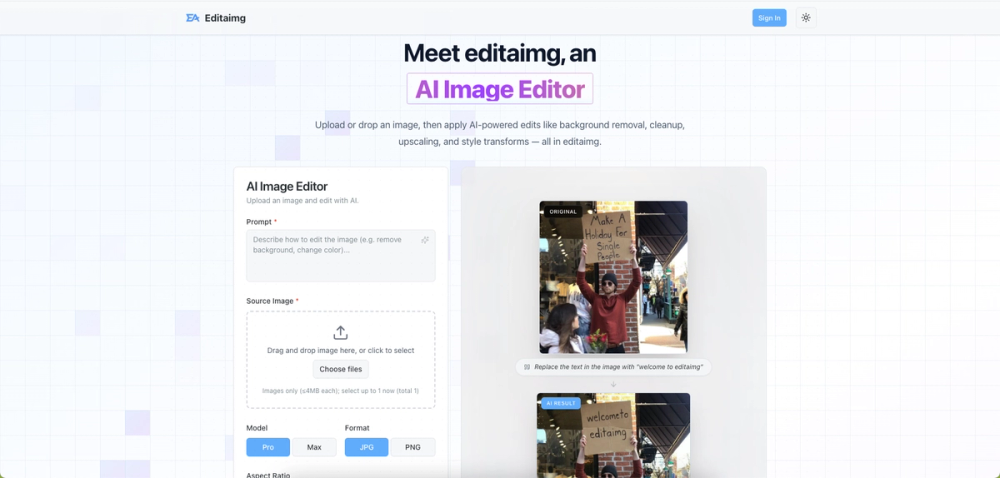
Editaimg is an advanced AI Image Editor designed to simplify and enhance photo editing for everyone, regardless of their professional skills. This powerful platform allows users to upload or drop images and apply a wide range of AI-powered edits, including background removal, object cleanup, resolution upscaling, and sophisticated style transformations. The tool emphasizes non-destructive editing, providing instant previews and one-click export options for streamlined workflows.
Key features of Editaimg include:
- AI-Powered Editing: Utilize smart tools for effortless background removal, precise cleanup and inpainting, intelligent image upscaling, and promptable transformations. This makes complex edits accessible without requiring specialized software knowledge.
- Style Transforms: Instantly alter the aesthetic of any image by applying artistic styles, adjusting color grading, and modifying lighting. This feature enables quick visual changes to match specific moods or branding requirements.
- Instant Preview & Share: Review edited images in a clear grid format and easily download or share them with a single click, facilitating efficient content creation and distribution.
Editaimg offers practical solutions for various use cases:
- Seamless Object Replacement: Users can subtly modify image details, such as swapping a coffee cup for a teacup, to perfectly align with their creative vision. The AI intelligently integrates new objects, ensuring a natural and realistic outcome.
- Realistic Product Shots: E-commerce businesses can transform basic white-background product images into professional, stunning visuals by placing items like a soap dispenser into realistic settings, such as a kitchen sink. This capability significantly enhances product presentation.
- Effortless Object Removal: Clean up photos by removing unwanted elements like people from travel pictures, distracting utility poles from landscapes, or clutter from beach scenes. The AI intelligently reconstructs the background, delivering clean and uncluttered final images.
The process of using Editaimg is straightforward, involving four easy steps:
- Import your image: Simply upload or drag and drop your image file into the AI Image Editor.
- Describe your idea: Clearly articulate how you wish to edit the image using a text prompt (e.g., "remove background," "change color").
- Choose settings: Configure additional parameters such as the desired aspect ratio and output format (JPG, PNG).
- Generate your edit: Click the "Generate Edit" button to let the AI process your request and produce the enhanced image.
Editaimg empowers users to unleash their creativity, offering capabilities like AI-powered object removal and replacement, seamless background changing, intelligent image cleanup, and the ability to download high-resolution results, all without requiring professional design skills.