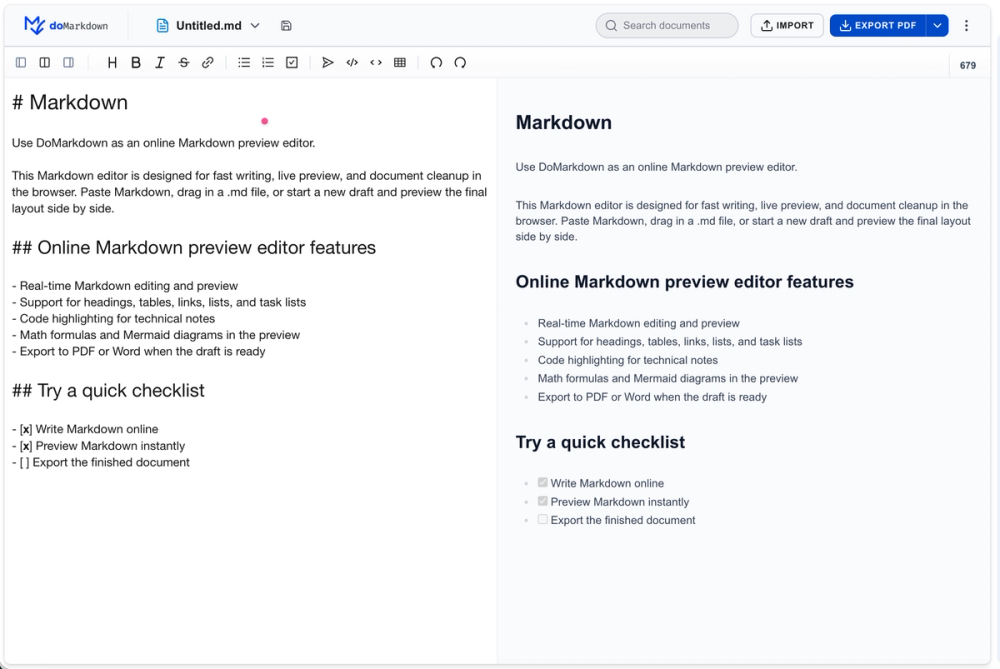
DoMarkdown is the ultimate all-in-one workspace, purpose-built to streamline the entire lifecycle of Markdown-based content creation, from the first keystroke to the final deliverable. Far more than a simple editor, it serves as a centralized command center where you can effortlessly write, visualize, refine, and transform your documents—all within a single, intuitive interface. With its powerful online live preview editor at the core, you can see your Markdown rendered in real time, side-by-side with your source code, eliminating guesswork and ensuring that every heading, table, code block, and embedded media appears exactly as intended before you ever hit export.
Live Online Preview & Editing: The heart of DoMarkdown lies in its synchronous split-pane editing environment. As you type or paste Markdown syntax, the live preview pane updates instantly, providing a pixel-perfect rendering of your final output. This immediate visual feedback allows you to catch formatting errors, fine-tune table alignments, and verify complex code syntax highlighting on the fly, drastically reducing revision cycles. Meanwhile, the editor bridges the gap between Markdown and all major document formats, enabling one-click bidirectional conversion that preserves your layout, styles, and structure with remarkable fidelity.
Markdown to Everything: When it's time to share or publish, DoMarkdown empowers you to export your .md files into a wide array of polished, professional formats with a single click. Whether you need Markdown to PDF for legally binding contracts or archival-grade documentation, Markdown to HTML for instant web publishing and responsive landing pages, or seamless integration with Google Docs and Word (DOCX), the platform handles every conversion with pixel-perfect precision. Generate publication-ready PDFs that preserve typography, margins, and embedded images, or craft clean, semantically valid HTML for dynamic websites and content management systems—all while retaining your chosen themes, fonts, and spacing. The Markdown to PDF workflow even supports custom CSS styling, enabling you to brand your documents effortlessly, while the Markdown to HTML engine produces fully responsive, accessible code suitable for any modern framework.
Everything to Markdown: Conversely, DoMarkdown makes it equally simple to import and repurpose existing content. Convert legacy PDFs, proprietary Word files, or even scanned images back into clean, semantically structured Markdown, unlocking your text for reuse in blogs, static site generators, wikis, or version-controlled repositories. Whether you are a developer documenting code, a writer drafting technical manuals, or a knowledge manager consolidating team resources, DoMarkdown delivers a frictionless, robust, and versatile environment—truly the perfect hub to preview, edit, and convert all your digital assets with unprecedented ease and efficiency. With native support for bulk conversions, customizable output presets, and cloud-sync capabilities, it's never been simpler to bridge the gap between your Markdown source and any destination format you require.