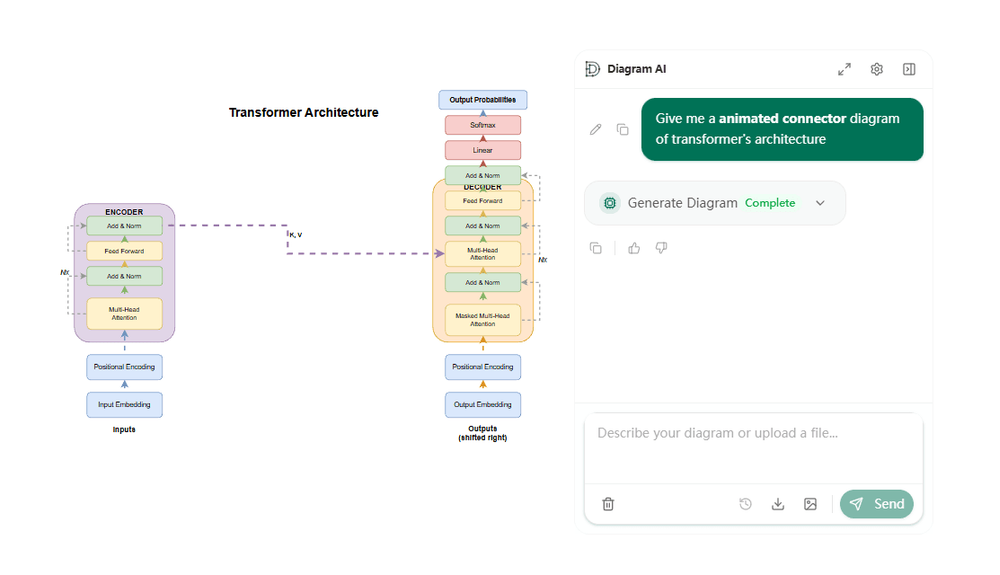
Diagram AI is an innovative AI-powered canvas designed to transform product ideas and complex information into clean, editable diagrams with remarkable ease. It streamlines the diagram creation process, allowing users to generate, refine, and restructure various types of diagrams from a single sentence.
The platform offers a comprehensive workflow:
- Capture Intent: Clearly state what you want to communicate and for whom.
- Generate a First Draft: Receive a structured diagram draft that is immediately editable.
- Co-edit with Chat: Interact with an AI assistant to request edits, rewording, hierarchy changes, and complete restructures.
- Publish Anywhere: Export your finished diagrams in standard formats like XML, SVG, or PNG for documentation and presentations.
Key features that make Diagram AI a powerful tool include:
- AI-Assisted Layout and Styling: Automatically generates diagrams with clean layouts, optimized spacing, and reduced crossings, ensuring clarity and readability.
- Interactive Canvas Editor: Provides an infinite canvas where users can drag, align, group, and refine diagram elements manually, offering full control over the visual presentation.
- Context Input: Enhance AI generation and editing by uploading relevant documents such as PDFs, images, or text, ensuring the diagrams accurately reflect your materials.
- Autolayout 2.0: Intelligently maintains diagram readability by optimizing spacing and flow, even after significant changes.
- Version History: Every AI-driven change is recorded, allowing users to restore any previous version with a single click, providing a safe environment for iteration.
- Standard Exports: Facilitates easy sharing and integration into other tools by supporting exports to XML, SVG, and PNG formats.
- Floating Chat Panel: Keeps the AI assistant readily accessible for quick edits and restructuring commands without interrupting the canvas workflow.
Diagram AI supports a wide range of common diagram types, including Flowcharts, Sequence Diagrams, Cloud Architecture diagrams, and Class Diagrams, making it versatile for various professional needs. It is built for iteration, enabling teams in product, engineering, and operations to move faster, standardize their visual documentation, and ensure accuracy. Testimonials highlight its ability to quickly turn discovery notes into customer journey maps, standardize service maps, and keep runbooks accurate by pulling live statuses, ultimately leading to smoother handoffs and faster updates. This tool is ideal for anyone looking to quickly visualize processes, systems, or ideas and maintain high-quality, editable diagrams.