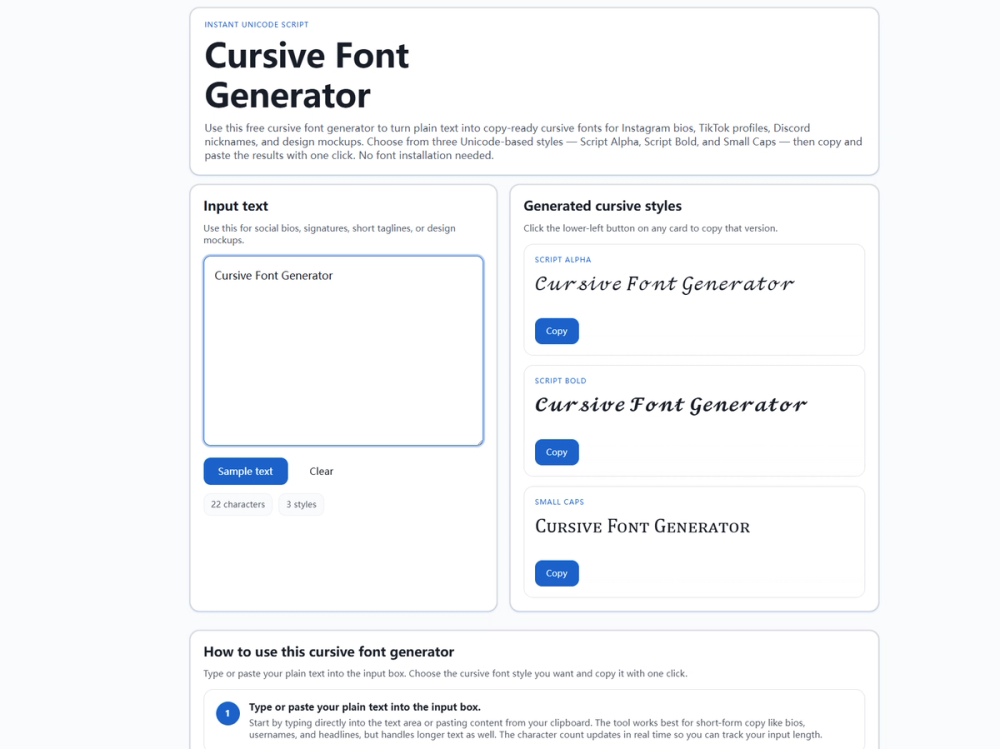
What Is a Cursive Font Generator? A cursive font generator — also called a cursive text generator — converts plain text into stylized Unicode characters that resemble script handwriting. Unlike traditional font files that require installation, the output is plain Unicode text you can copy and paste anywhere. The tool at cursivefontgen.com provides three curated styles: Script Alpha (light elegant script), Script Bold (heavier cursive weight), and Small Caps (petite uppercase glyphs). It runs entirely in your browser as a single HTML page with no external dependencies, no registration, and no usage limits.
Users typically discover this tool when they need to stand out on social media — a distinctive Instagram bio, a memorable Discord nickname, or a polished TikTok profile name — without learning graphic design software or installing font packages.
How It Works The tool maps each letter (A–Z, a–z) to a corresponding Unicode character using a JavaScript lookup table. Characters like "A" become "𝒜" (Mathematical Script Capital A, U+1D49C) in Script Alpha, or "𝓐" (Mathematical Bold Script Capital A, U+1D4D0) in Script Bold. Letters without mapped equivalents — numbers, punctuation, non-Latin scripts — pass through unchanged.
This is fundamentally different from font files. Fonts require the recipient to have the same font installed; Unicode characters travel with the text itself. Every modern platform ships system fonts with glyphs for these ranges — Segoe UI Symbol / Cambria Math on Windows, Apple system fonts on macOS, Noto or Roboto on Android — so the cursive appearance is preserved wherever you paste.
Limitations: Unicode script glyphs are fixed — you cannot customize weight, spacing, or slant. A small number of letters (Q, s, x) lack true small-cap variants in Unicode and fall back to standard forms. Additionally, some older platforms may display placeholder boxes for less common code points. Always preview on your target platform before publishing, and test across both mobile and desktop views.
Three Cursive Styles Script Alpha uses thin, flowing strokes resembling elegant handwriting. Best for signatures, wedding invitation text, Instagram bio accents, quote cards, and email flourishes. Its light weight pairs well with bold body text but becomes hard to read at small sizes or in long passages — use it for short, impactful lines.
Script Bold carries heavier visual weight while maintaining a flowing aesthetic. Best for social media headlines, YouTube video titles, TikTok text overlays, Discord server names, Pinterest pin titles, and Canva mockup headers. Its thicker strokes remain readable at smaller sizes, making it the most versatile of the three styles.
Small Caps converts lowercase letters to petite uppercase forms while leaving capitals at full size. Best for professional profile names (LinkedIn, X), author bylines, section headers, brand taglines, and monogram-style initials. The most conservative style, suited for refined typographic contexts.