LogoToolFame
  • Category
  • Blog
  • Pricing
  • Submit
LogoToolFame
  1. Home
  2. Category
  3. Crumb

Crumb

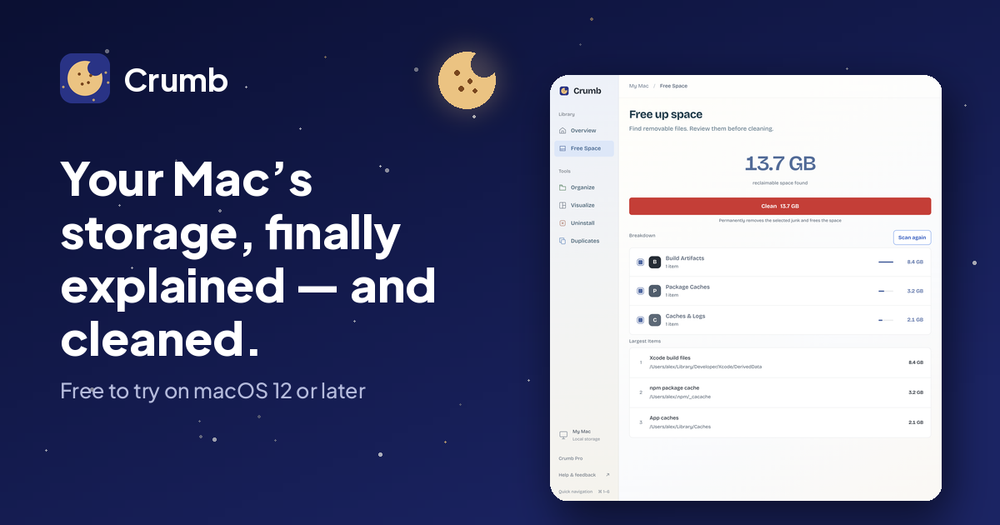
Crumb is a macOS menu-bar app that explains and cleans your whole Mac. See exactly what is using your space (caches, System Data, old apps) and clean ...

Visit Website
image of Crumb
Visit Website

Introduction

Crumb is an intuitive macOS menu-bar application designed to demystify and optimize your Mac's storage. It provides a clear, detailed breakdown of what's consuming your disk space, including often-obscure categories like "System Data," caches, logs, and developer-specific files such as Xcode build data and node_modules. Unlike the native macOS storage settings, Crumb offers granular insights, explaining exactly what each item is, its size, and whether it's safe to delete or if it will regenerate.

The application operates on a principle of transparency and user control, ensuring nothing is removed without your explicit approval. Its three-step process begins with a read-only scan that meticulously maps your disk usage without altering any files. Following the scan, you enter a review phase where every identified item is presented with its size and a clear explanation. You can untick anything you wish to keep, and for uncertain items, Crumb provides a "Safe?" check to clarify the implications of deletion. Finally, upon your approval, Crumb efficiently frees up space, showing you precisely how much storage has been reclaimed.

Crumb integrates six powerful tools into a single, easily accessible menu-bar app:

  • Free Space: Identifies and totals reclaimable space from caches, logs, build artifacts, and package caches.
  • Visualize: Ranks your largest folders, offering a "Safe?" check for each to help you understand their contents.
  • Uninstall: Ensures complete removal of applications, including all associated support files, caches, and preferences that often linger after a simple drag-to-trash.
  • Duplicates: Scans your entire Mac to find identical files, allowing you to keep just one copy and delete the rest.
  • Organize: Helps declutter messy folders like "Downloads" by sorting files into type-based subfolders, with a preview of the changes before execution.
  • Is this safe to delete?: A unique feature that allows you to point Crumb at any folder, and it will explain its purpose, whether it regenerates, and what might break if it's removed.

Built with trust and privacy in mind, Crumb performs all scans locally on your Mac, requiring no account or sign-in, and ensuring your files never leave your device. It prioritizes the protection of your personal documents and photos, never including them in its default recommendations for deletion. Crumb is available as a native download for both Apple Silicon and Intel Macs, supporting macOS 12 or later. It offers a free version with a full scan and one cleanup, with a one-time purchase of $9 unlocking unlimited cleanups and all advanced tools, without any subscriptions.

Back

Information

  • Publisher
    SukanyaSukanya
  • Websitecleanwithcrumb.com
  • Published date2026/10/21

Categories

  • Productivity
  • Development
  • Management

Tags

  • Mac
  • Paid
  • Free
  • English Supported
  • Professional
image of ProductFame
Sponsored
MarketingSEODirectories

ProductFame

ProductFame is a product launch platform that helps users discover popular products and helps founders gain real feedback, early traffic, and valuable...

More Products

image of DeepInfer
AIDevelopmentResearch
Visit Details

DeepInfer

Details

DeepInfer is DeepSeek's Apache-2.0 inference framework for V4.1-Flash. An independent guide to what shipped

AIOpen SourceLinuxProfessionalAdvanced
image of ChatSweep: ChatGPT Bulk Delete
ProductivityChatbotAI
Visit Details

ChatSweep: ChatGPT Bulk Delete

Details

ChatGPT Bulk Delete helps you delete multiple chats in ChatGPT. Select loaded conversations, review your batch, and delete or archive from one clear panel.

Browser ExtensionWebAIFreePaid
image of Freight Class Calculator
ProductivityManagement
Visit Details

Freight Class Calculator

Details

Free freight class calculator for LTL. Enter pallet size and weight to get cubic feet, density and NMFC class on the 13-tier scale in effect since July 2025.

FreeWebEnglish SupportedBeginner

Newsletter

Join the Community

Subscribe to our newsletter for the latest news and updates

LogoToolFame

ToolFame - Popular Online Tools Directory

X (Twitter)
Made with❤️byHyhor
Product
  • Submit
  • Pricing
  • Category
Explore
  • Tag
  • Blog
  • Collection
Contact
  • Twitter
  • Email
More
  • About Us
  • Privacy Policy
  • Terms of Service
  • Sitemap

Quick Links - Explore more trending tools & products

  • AI Tools
  • Video Tools
  • Audio Tools
  • Image Tools
  • Animation Tools
  • 3D Tools
  • Writing Tools
  • Data Analysis Tools
  • Social Media Tools
  • Productivity Tools
  • Content creation Tools
  • Directories Tools
  • Development Tools
  • Freelancer tools Tools
  • Boilerplates Tools
  • Remote work Tools
  • Design Tools
  • Chatbot Tools
  • Daily Life Tools
  • Community Tools
  • Legal Tools
  • Finance Tools
  • E-commerce Tools
  • Marketing Tools
  • SEO Tools
  • Health Tools
  • Research Tools
  • Education Tools
  • Translation Tools
  • Monitoring Tools
  • Management Tools
  • Inspiration Tools
Copyright © 2026 All Rights Reserved.
Featured on ProductFameFeatured on aitoolfame.comFeatured on saasfame.comFeatured on toolfame.comFeatured on directoryfame.comFeatured on findly.toolsFeatured on Startup FameListed on Turbo0Featured on Dofollow.ToolsFazier badgeFeatured on Twelve Tools