Overview
Convertir Audio a MP3 is a lightweight, browser-based audio toolkit for creators, marketers, and developers who just need things to work without installing software.
From one place you can:
- Convert almost any audio or video file to MP3
- Extract audio from YouTube-like videos (after downloading them)
- Clean up WhatsApp / Telegram voice notes
- Trim, cut, merge and compress MP3 files
- Transcribe audio to text directly in the browser
No registration, no watermarks, and a mobile-first UI so you can fix audio from your phone or laptop in a few seconds.
Key Features
-
Audio → MP3 converter
Upload audio in common formats (WAV, M4A, OGG, AAC, OPUS, AMR, etc.) and get a clean MP3 back, ready for editing or publishing. -
Video → MP3 extractor
Upload MP4, MOV, MKV and other video files and extract only the audio track as MP3. Perfect for repurposing video content as podcasts or voice-overs. -
WhatsApp / Telegram voice notes to MP3
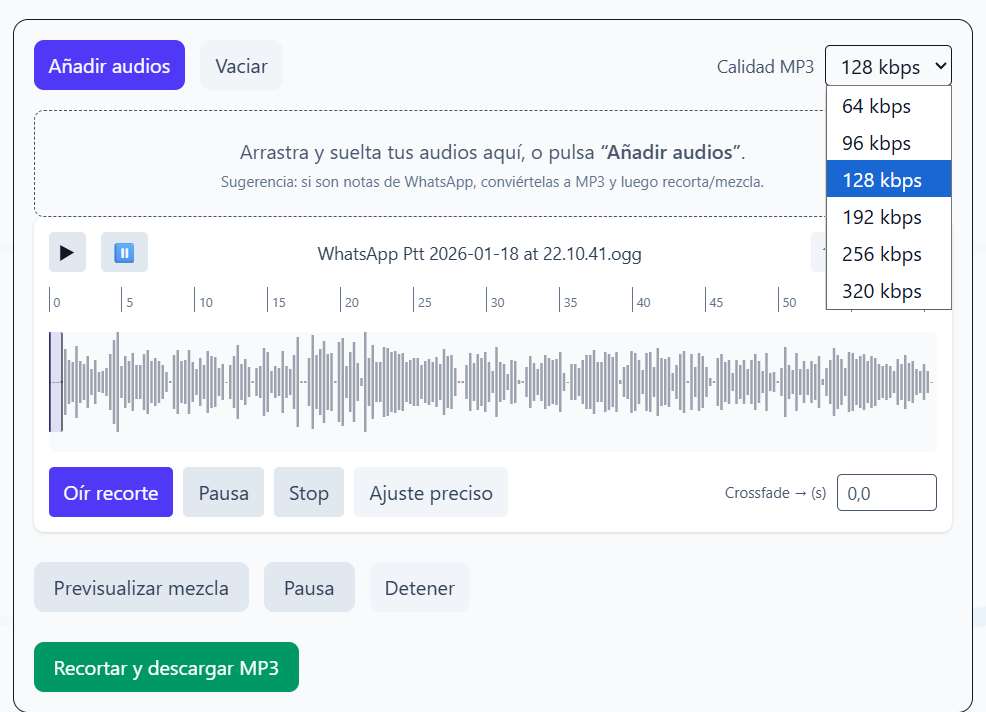
Turn.ogg/.opusvoice messages into MP3 so you can edit them, archive them, or reuse them in other tools. -
Trim & cut audio
Remove intros/outros, cut mistakes, or create shorter clips for shorts, reels, and stories with a simple in-browser editor. -
Mix and merge tracks
Combine multiple audio files, adjust order and duration, and export a single MP3 file. -
Compress MP3 files
Reduce file size while keeping acceptable quality. Ideal for email attachments, web hosting, or messaging apps with limits. -
Transcribe audio to text
Turn audio into text to create captions, notes, or draft blog posts from voice recordings.
Use Cases
-
Podcast & YouTube creators
Extract audio from video, trim files, and compress final MP3s before uploading. -
Social media & marketing teams
Quickly cut snippets from long recordings to reuse in TikTok, Reels, or shorts. -
Developers & product teams
Need a quick way to convert users’ audio uploads to MP3 before processing them elsewhere. -
Students & professionals
Transcribe voice notes and meetings, then clean and compress the original audio.
Getting Started
- Go to https://convertiraudioamp3.com/
- Choose the tool you need: convert, trim, merge, compress, or transcribe.
- Drag & drop your file or select it from your device.
- Adjust the options (bitrate, start/end time, etc.).
- Click Convert and download your processed MP3 or transcript.
No account is required, and the interface is designed to be usable on both desktop and mobile browsers.
Pricing & Plans
Convertir Audio a MP3 is currently 100% free to use, with no sign-up or login required.
The project is maintained by an independent full-stack developer and supported through donations and feedback from users. In the future, optional pro features may be added, but the core tools for converting, trimming, merging, and compressing audio will remain free.
Roadmap
- Better batch processing for multiple files
- Small quality-of-life improvements for heavy creators (presets, recent files, etc.)
If you’re a creator or developer who regularly works with audio, Convertir Audio a MP3 aims to be the fastest way to go from “raw file” to “ready-to-publish MP3” directly in your browser.