Converrt Any: The Ultimate Offline File Converter
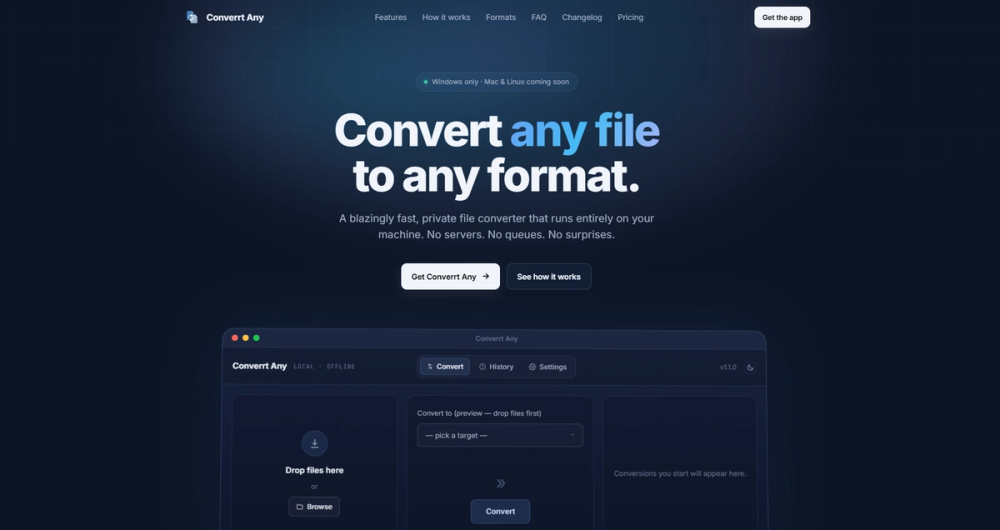
Converrt Any is a blazingly fast, private file converter designed to run entirely on your Windows machine, with Mac and Linux versions coming soon. Unlike online converters, it processes all files locally, ensuring your data never leaves your device. This means no uploads, no tracking, no servers, and absolute privacy for your sensitive documents and media.
Key Features & Benefits:
- Comprehensive Format Support: Converrt Any boasts support for over 200 file formats and an impressive 5,600+ conversion routes. This includes a wide array of categories such as images (PNG, JPG, WEBP, AVIF, HEIC, TIFF, RAW, PSD), video (MP4, MOV, MKV, WEBM, AVI, ProRes), audio (MP3, WAV, FLAC, AAC, ALAC), documents (PDF, DOCX, TXT, MD, EPUB), spreadsheets (XLSX, CSV, JSON), and archives (ZIP, RAR, 7Z).
- Intelligent Multi-Step Conversions: For pairs without a direct conversion path, the app intelligently chains intermediate formats automatically. For example, it can convert HEIC → PNG → AVIF or RAW → TIFF → JPG, ensuring you get the desired output without manual intervention.
- Blazing Fast Performance: Leveraging your local CPU and GPU, Converrt Any delivers conversions at gigabytes per minute, unhindered by internet upload or download speeds. This makes it significantly faster than web-based alternatives, especially for large files.
- Uncompromised Privacy: This is a core differentiator. Your files are never uploaded to third-party servers, stored, indexed, or resold. The only network interaction is a one-time license activation, after which the app functions completely offline. No accounts, no telemetry, no analytics, no ads.
- User-Friendly Interface: The application features a clean, intuitive interface with drag-and-drop functionality for single or batch conversions.
- Drag & Drop: Easily drop one or hundreds of files into the queue.
- Light & Dark Modes: Adapts to your system theme or allows manual selection for optimal viewing comfort.
- Format Search: Quickly find any of the 200+ formats by typing names, extensions, or common aliases.
- Favorite Formats: Pin your most-used formats to the top of the picker for quick access, with preferences remembered across sessions.
- History Tab: Keep a local record of all past conversions, allowing for one-click re-runs or easy access to output folders.
- No Limits, No Watermarks: Unlike many free online converters, Converrt Any imposes no file size limits, allowing you to convert anything from a 2 KB icon to a 50 GB video. It also guarantees pixel-for-pixel output without adding watermarks or compromising quality.
- One-Time Purchase: The app operates on a simple, transparent pricing model: a single, one-time payment grants you a lifetime license, including free updates for life and usage on up to three devices. There are no subscriptions, hidden fees, or upsells.
Use Cases:
Converrt Any is ideal for professionals, content creators, and anyone who frequently needs to convert files while prioritizing speed, privacy, and convenience. Whether you're converting high-resolution images for a project, re-encoding large video files, or transforming documents for compatibility, Converrt Any provides a robust, secure, and efficient desktop solution. It's particularly valuable for users working with sensitive data or in environments with unreliable internet access.
Future Development:
While currently optimized for Windows 10/11 (x64 and ARM64), active development is underway for Mac and Linux versions, which will be provided as free updates to existing license holders. The developer actively solicits user feedback for prioritizing new format additions and features.