App Icon Creator - IconDino 🦖
Purpose
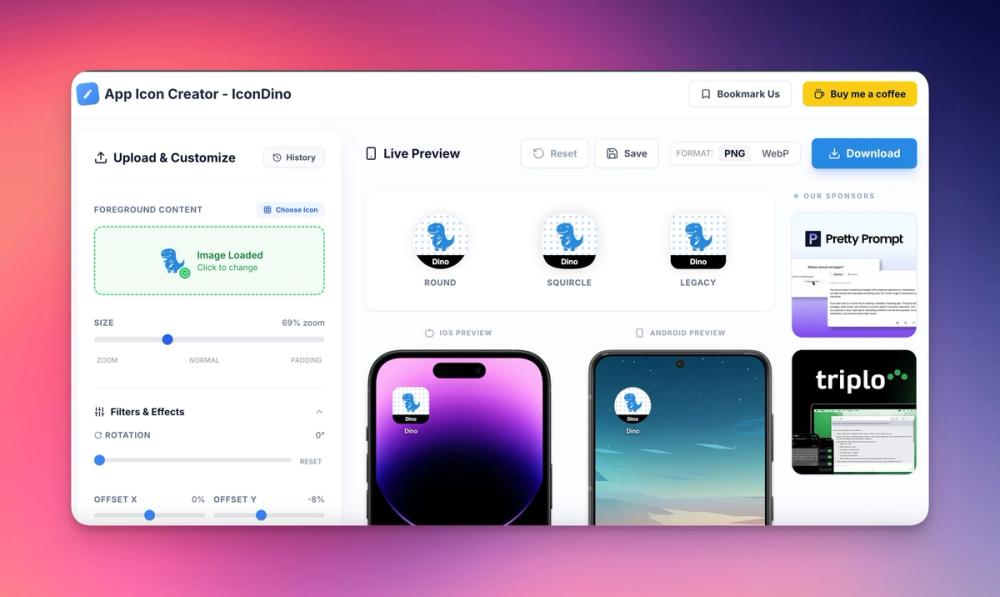
IconDino is the ultimate professional tool for mobile developers and designers to create stunning, store-ready app icons in seconds. Built for speed and precision, it simplifies the complex process of generating assets for both iOS and Android, ensuring your app stands out on every home screen.
🚀 Key Features
1. Unified iOS & Android Support
- iOS Squircles: Automatically generated with the perfect curvature for Apple's design system.
- Android Adaptive Icons: Create the required background and foreground layers for modern Android adaptive icons.
- Legacy Support: Generate classic square icons for older versions and specific platforms.
2. Live Device Mockups
- Real-Time Preview: See your changes instantly on realistic iPhone and Google Pixel mockups.
- Contextual Visualization: View how your icon looks with names and labels as it would appear in a real mobile UI.
3. Powerful Customization Engine
- Flexible Backgrounds: Choose between vibrant solid colors or sophisticated linear and radial gradients.
- Pattern Overlays: Add texture with Dots, Grid, Lines, and Noise patterns with adjustable opacity and scale.
- Icon Library: Access a full library of professional icons (via Lucide) or upload your own SVG/PNG/JPG assets.
4. Advanced Visual Effects
- Shadow Controls: Implement modern "Drop Shadows" or trendy "Long Shadows" with full control over angle, blur, and opacity.
- Image Filters: Fine-tune your assets with Brightness, Contrast, Grayscale, and Invert filters.
- Transform Tools: Rotate, zoom, and offset your foreground elements for the perfect composition.
5. Professional Branding Tools
- Custom Badges: Add "Beta", "Pro", or update labels with custom text, colors, and font styling.
- Monochrome Support: Generate Android 14+ themed (monochrome) icons to support system-wide personalization.
6. Developer-First Workflow
- One-Click Export: Download a complete, organized ZIP file containing all required sizes and formats.
- Format Options: Choose between high-quality PNG or optimized WebP formats.
- Design History: Never lose a design with the built-in auto-save and history feature, allowing you to revisit previous iterations.
- Privacy First: All icon generation happens locally in your browser. Your assets are never uploaded to a server.
🛠 Target Audience
- Indie Developers: Save hours of design work and generate assets without opening Photoshop or Figma.
- App Designers: Quickly prototype and test how different concepts look on real devices.
- Marketing Managers: Create variants for seasonal updates (Winter/Summer) or specialized "Pro" versions easily.
🎯 Purpose of IconDino
The purpose of IconDino is to bridge the gap between "design" and "deployment." We know that creating the perfect app icon involves more than just a square image—it requires testing, layering, and meeting strict platform guidelines. IconDino handles the technical heavy lifting so you can focus on building your app.