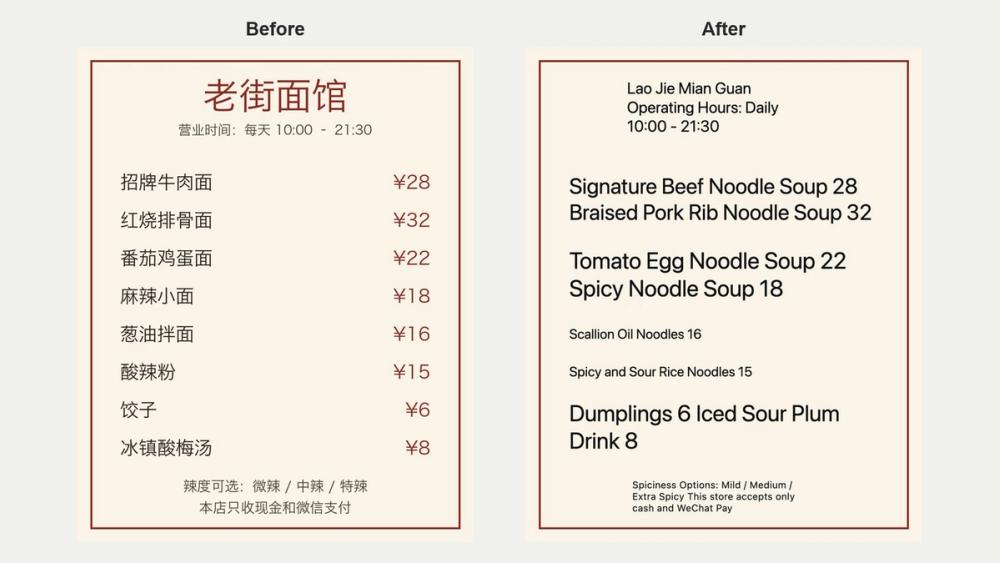
AnyFileKit Image Translator translates the text in a photo or screenshot right in your browser. The picture is read on your own computer and never uploaded; only the words it finds are sent to be translated, and the translation is painted back over the picture where the original text was.
It reads English, Simplified Chinese, Traditional Chinese, Spanish, Portuguese and Russian, and translates into 19 languages. Japanese, Korean, Arabic and Thai cannot be read from a picture yet, but all of them work as languages to translate into.
How it works: choose a PNG, JPG or WebP image, pick the language of the text and the language you want, and wait a few seconds. You can download the result as a picture, or view the original and translated lines side by side.
Good uses: a menu or sign photographed while traveling, a product photo from an overseas shop, a screenshot of a chat or an app in a language you do not read, or a scanned page that has no text layer.
Flat printed text photographed straight on works best. If no text is found, the tool says so and stops, and nothing counts against your daily allowance.
5 pages a day are free, with no account and no watermark.