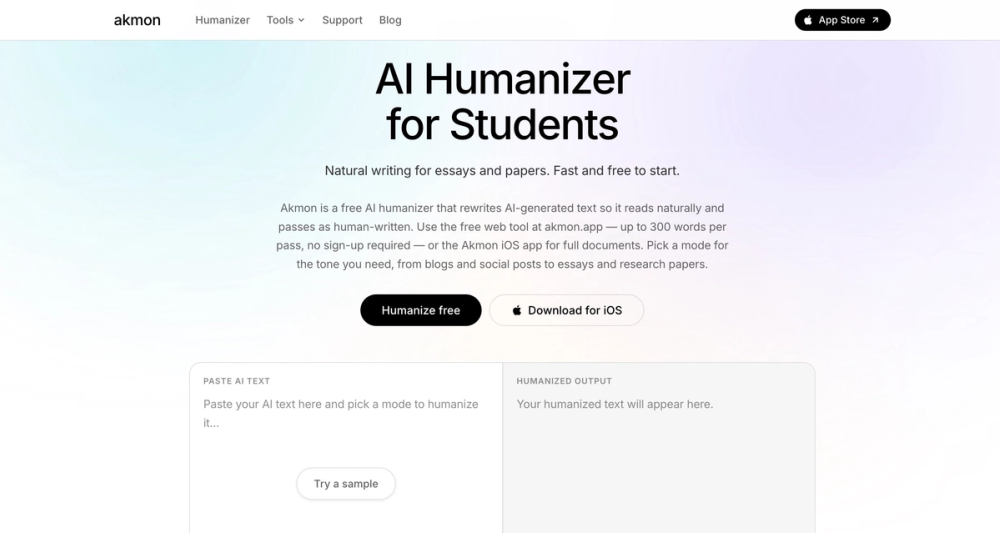
Free AI humanizer + study toolkit - no sign-up required. Introduction: Akmon is a free AI humanizer and study toolkit built for students, writers, educators, and productivity-focused users who want drafts to sound clear, natural, and easy to read.
The product is available on the web at https://akmon.app and as an iPhone app. The web version is simple to start because users can open the page, paste text, and improve a draft without creating an account. That low-friction flow is useful for people who need quick help during study sessions, essay editing, note cleanup, research work, or content polishing.
The core Akmon feature is an AI Humanizer that rewrites robotic or rough text into writing that feels more human, direct, and polished. Instead of making a user learn complicated settings, Akmon gives a straightforward workspace: paste text, choose the style that fits the task, and generate a cleaner version. The tool is designed for everyday writing situations such as school assignments, article drafts, emails, summaries, application text, and personal notes. It helps users keep their meaning while improving rhythm, tone, and readability. Akmon is especially useful for students because academic writing often starts messy.
A student may collect ideas from lectures, class readings, research notes, or early outlines, then need to turn those ideas into paragraphs that are easier to understand. Akmon can help reshape that first draft into a version that sounds more natural and organized. The goal is not to replace thinking or research. The goal is to give the user a cleaner starting point so they can review, edit, fact-check, and make the work their own before submitting or publishing it.
The product also works well for non-native English speakers. Many people understand a topic clearly but struggle to make English sentences flow naturally. Akmon can smooth awkward phrasing, reduce stiff wording, and make ideas easier for readers to follow. This can be helpful for international students, freelancers, startup founders, job applicants, and anyone who writes in English as a second language. Because the workflow is fast, users can test several versions and choose the one that best matches their intended voice.
Akmon includes different rewrite styles for different needs. A casual mode can make writing sound friendlier and more conversational, while an academic style can keep the tone more structured and formal. This matters because the best version of a sentence depends on context. A paragraph for an essay should not sound the same as a social post, a product description, or a short email. By giving users style options, Akmon helps them adapt the same idea to the audience and situation.
The service is positioned as a free, practical toolkit rather than a complex enterprise platform. Public information on the site highlights that users can start free, work without sign-up on the web, and process text quickly.
The interface is meant to remove extra steps and keep attention on the draft. That makes Akmon a good fit for users who do not want to manage a complicated writing suite, install heavy software, or pay before they know whether the tool helps their daily workflow.
Beyond humanizing text, Akmon offers other AI-powered utilities for study and productivity. The toolkit includes tools such as an AI Paraphraser, PDF Summarizer, PDF Translator, Math Solver, YouTube Summarizer, Em Dash Remover, Extra Spaces Remover, Line Break Remover, and Invisible Characters Remover.
These tools cover common problems that appear during schoolwork and online research: long documents need summarizing, videos need quick notes, messy copied text needs cleanup, and math tasks need step-by-step support.