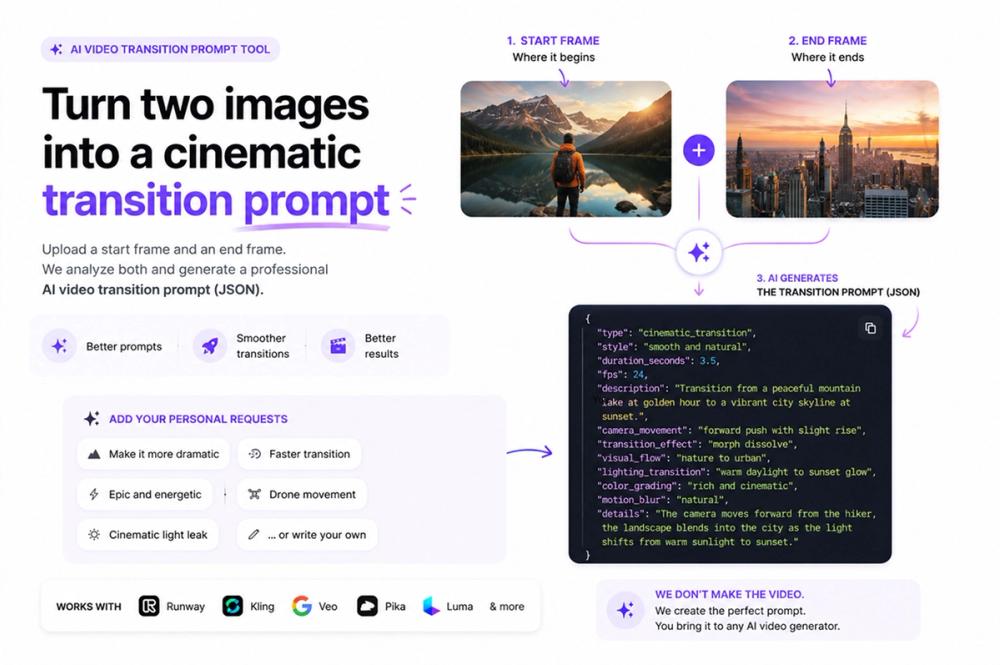
The AI Video Transition Generator turns two still images into a ready-to-use transition prompt in about 30 seconds. You upload a start frame and an end frame, and the tool writes a detailed, model-ready prompt that describes exactly how one shot should morph, cut, or flow into the other. No timeline editing, no keyframing by hand, and no signup required. It is completely free.
Most creators know the feeling: you have two great frames, but the space between them is where videos either look professional or look amateur. A clumsy transition kills the momentum of a reel. This tool solves that gap. It analyzes both frames, identifies the visual relationship between them (shared shapes, color, motion direction, subject position), and produces a precise prompt that tells your video model how to bridge them. Think match cuts, seamless morphs, whip pans, zoom transitions, object reveals, and more, all described in the structured language that today's AI video models respond to best.
The output is built to drop straight into the leading generators. Whether you work in Kling, Runway, or Luma, the prompt is formatted for that workflow, so you spend your time creating instead of guessing at phrasing. Because the prompt is grounded in your actual start and end frames, the result stays faithful to your creative intent rather than producing a random clip.
It is ideal for short-form creators, e-commerce and product marketers, social media managers, and anyone building TikTok, Reels, or Shorts content who wants scroll-stopping transitions without a motion-design background. The whole flow takes seconds: upload two frames, get your transition prompt, copy it into your video tool, and generate. No account, no credit card, no watermark.
The AI Video Transition Generator is part of Free AI Video Hub, a growing collection of free tools that help you write better AI video prompts for product videos, talking pets, image-to-video animation, and more.